

Every review I read before I bought my Redragon K580 said the same three things. It's heavy. It's built well. It clicks nicely. Nobody told me it would be loud enough to bounce off the concrete walls of my garage. Nobody told me the first thing I'd do with the rainbow wiring is set it to one plain color and forget the rest existed. And nobody told me that six months later, the part I'd care about most wouldn't be the lighting or the macros. It would be the faint polish on four or five keycaps where my fingers land.
I'm Walt Hargrove. I fix heavy equipment for a living and build old hot rods on the side, which is how my home office ended up being the corner of my garage I cleared off, and my desk a workbench that's taken a hundred years of honest abuse. Dozer, my bulldog, owns the concrete floor. When my shop started taking video calls with parts suppliers and customers, I finally gave in and built a real desk setup, and a good keyboard was first on my list. The K580 has sat on that bench for six months. This is the honest version of that time, the parts the ads leave out.
The Quick Verdict
Six months in, the K580 is a genuinely solid board that earns its place on a bench. The honest catch is threefold: it's loud, the rainbow lighting is a novelty you'll outgrow by week three, and the glossy keycaps show every fingerprint and a little shine where you type. None of that makes it a bad keyboard. It makes it a real one, and real is what I keep coming back to.
Amazon Check Today's Price →Tired of a board that bends in the middle and types soft? Start with the honest option.
If you're setting up your first real home office and you want a keyboard that feels like it was built instead of assembled, the K580 is where I'd point you. See today's price and current availability on Amazon.
Amazon Check Today's Price on Amazon →How I've Used It (and What Really Happened)
I want to start with how I actually used this board, because the marketing assumes you're a gamer, and I am emphatically not. I'm a mechanic. My days at that bench are parts orders, invoices, estimates, email, and the occasional video call where I'm trying to sound like I know what I'm doing with a monitor rather than just pointing at it. A typical busy day puts two to three hours of real typing on the board, plus the constant hunt and peck while I look things up. Not gamer volume, but steady, heavy office volume, the kind that kills a cheap keyboard inside a year.
For the first week I treated it like any new tool, which means I studied it. I turned every color of the rainbow on just to see it. I poked all five macro buttons on the left edge and immediately regretted it, because two of them are easy to slap by accident when you reach for the shift key. By week two I had it set to a steady red, dim, the way a late night in a garage should look. Six months later that's still exactly how it sits. That arc, from bright to plain, is the honest story of a keyboard with RGB lighting.
When the box showed up, the first thing I noticed, before I even plugged it in, was the weight of it. A cheesy keyboard comes out of the box feeling like a toy you'd win at a fair. This one lands on the bench with real heft, and the second you pick it up you can tell it's not going to fold under a day of serious typing. That first impression matters. A tool that feels right in the hand on day one is a tool you'll keep using, and the K580 felt like it belonged on that workbench the moment I set it down.
The Switches: Clicky, and Nobody Warns You How Much
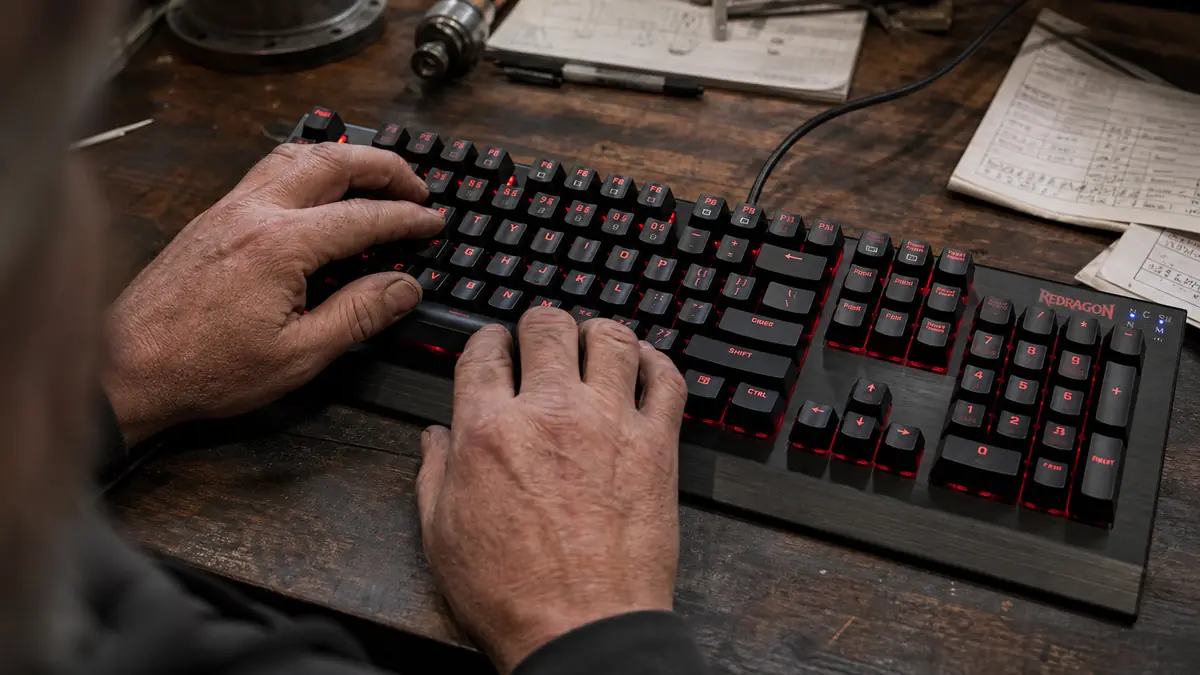
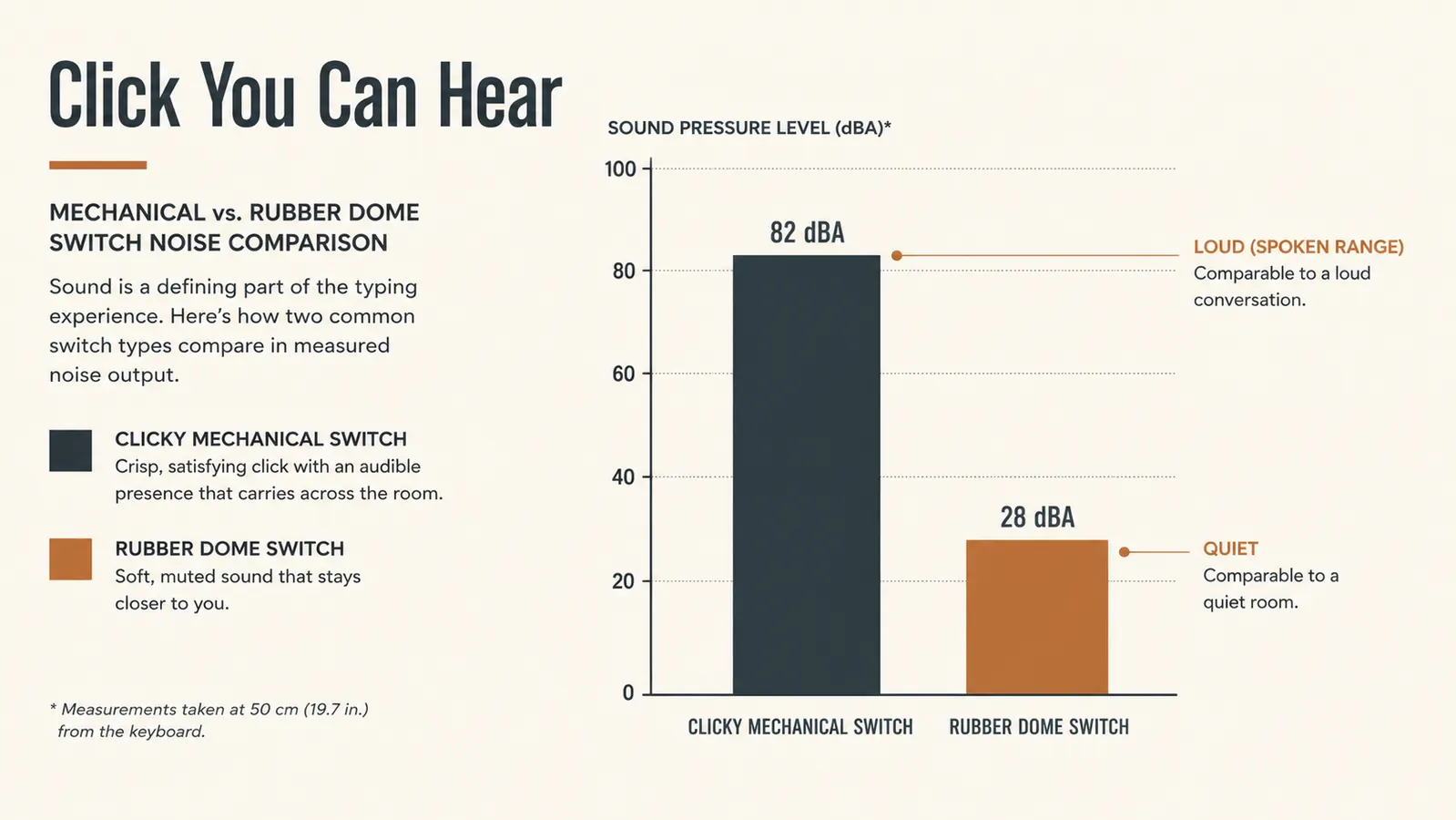
Here's the thing nobody puts in bold on the box. The K580 is a clicky board. The switches under the keys are the type that give you a firm bump and an audible click on every single press, the way a nice ratchet clicks when it engages. That feel is wonderful for typing. It tells your finger, without you looking, that the key registered. You develop a rhythm, and the keyboard gets out of the way of the work, which is the whole reason I bought it.
But that click is loud, and I don't mean a little loud. On a desk in a shared room it will be the thing everyone in that room hears all day. In my garage, with concrete walls, a steel tool chest, and nothing soft in the room to soak up the sound, it positively bounces. Dozer doesn't care, nothing wakes that dog, but if you share office space or you work late with someone asleep down the hall, you need to know this before you buy, because there is no quiet mode. You can't download the click away.
That's the honest trade. You buy a clicky board for the feel, and you pay for it in the sound. Six months in I wouldn't trade the feel back for the silence, because for me a keyboard that tells your hands it worked is worth the clatter. But I'd have appreciated knowing in advance that the nice people on the video calls could hear every key the moment I typed a long reply.
One more note on the feel, because it's the thing I'd want someone to tell me. That click isn't just noise, it's feedback built into the key. When I'm typing an invoice and my eyes are on the screen instead of my hands, the click is what tells me the character actually landed. On a rubber dome board you never quite trust it, so you press harder and look at the keys more and slow yourself down. On the K580 I stopped looking down entirely by week three. For a man who spends his days with his eyes on a wrench rather than a screen, a keyboard that lets me keep my eyes where they need to be is a quiet kind of gift.
The Keycaps and the Fingerprint Problem
The second thing nobody tells you. Those keycaps look great in the product photos, glossy and colorful in the light. Then you actually use the board with the hands God gave you, and mine are the greasy hands of a man who fixes machines. Every single key I touch shows a fingerprint. You see it in daylight especially, the little smudges lining up right where your fingers live. I have to wipe the board off with a rag far more often than I wipe my actual desk, and my desk is a workbench.
There's a better side to this, and I want to give it credit. The lettering on the keys has not worn off, not a single letter, and I type hard and a lot. On every rubber dome board I've owned, the letters started going fuzzy after a few months. That's been the real difference here. The finish might pick up a shine and the top surface shows fingerprints, but the print that matters, the letters, is still as crisp as the day it arrived. For me, legible letters beat a clean finish every time.
One more wear note, because an honest man tells you these things. The four or five keys I hit most, the letters and the spacebar, have gone slightly shiny where my thumb and forefingers land. It's not worn through, it's just polished, like a favorite wrench handle. Six months of daily pressing will do that to any cap, and it doesn't change how the board feels or works. But if you hate the look of a lightly used key even a little, now you know it happens.
The Lighting, the Macros, and What You'll Actually Use
Let me be blunt about the RGB lighting, since it's the biggest thing in the marketing. It's a lovely light show the first time you turn it on, and then real life arrives. I cycled every mode once, went huh, that's neat, and set it to a steady dim red. That's where it's been for five and a half months. The rainbow wave and the breathing patterns are for people who want their computer to look like the floor of a busy casino. If that's you, it's all there. If it's not, you'll turn it down and forget it, and that's fine too. It's not a reason to buy the board, and it's not a reason to avoid it.
The media wheel up top, which I've set to volume, is the one extra I use every single day. On a video call it's the difference between scrambling for the headset and just rolling a thumb to quiet the room. Simple, and it's never once fought me. The five macro buttons along the left edge are a different story. I set exactly one, the keystroke I use to confirm an order, then I hit one of the others by accident while reaching for the shift key, and I stopped bothering with them entirely. They're easy to press by mistake and finicky to program. If you buy it for the macros, you'll be disappointed. If you ignore them, the board works perfectly as a plain, honest keyboard.
Is a Mechanical Keyboard Worth It for a First Office?
The question I get asked most by other guys setting up a first home office is whether a mechanical keyboard is worth the money at all, and I'll give you the same answer I give them. If you sit at a desk and type for hours a day, yes, for the feel and the durability. If you touch a keyboard twice a week, no, and there's no shame in that. The K580 is not a bargain in the sense of being the cheapest thing on the shelf. It's a bargain in the sense of being the last keyboard you'll have to think about for a long stretch, and that's the kind of math a mechanic understands. Buy once, use it hard, don't buy it again.
I did my homework on the alternatives before I committed, and I laid the whole thing out side by side in a separate comparison of the K580 against a cheap membrane board, because that's the real decision most people are weighing. The short version of what I learned is that a rubber dome keyboard is fine on day one and gets a little worse every month, while the K580 is good on day one and still good in month six. That's the entire argument as far as I'm concerned. Durability is the feature that matters, and it's the one you can't see in the marketing photos.
It's also worth saying plainly that no keyboard fixes a badly set up desk. I learned early that if the board sits too high or my arms are wrong, no switch in the world saves my wrists, and I have a whole separate guide on that side of it if you're fighting wrist pain from long days at a keyboard. The K580 does its part, which is give your hands a firm, honest surface to work on. The rest is up to how you set the chair, the desk, and your own posture.
What I Liked
- A solid, heavy frame with a metal top plate that doesn't flex, even under hard typing
- Clicky switches give honest, tactile feedback on every press, and it never varies
- The lettering on the keycaps is still crisp after six months of daily use, no fading
- A wired board, so no battery to charge and no pairing to fight
- The volume wheel is genuinely useful on video calls
Where It Falls Short
- The clicky switches are loud enough to be heard across a quiet room, and there's no quiet mode
- The glossy keycaps show fingerprints badly on greasy hands and polish up where you type
- The rainbow RGB is a novelty most people will set to one color after week one
- The left-side macro buttons are easy to hit by accident and fiddly to program
Six months and a mountain of invoices later, every letter on this board still reads crisp and every key still lands exactly like it did the day the box showed up. That's the test that matters.

Who This Is For
You're this keyboard's person if you spend real hours a day typing and you want a board that feels built instead of assembled. If your day is order entry, invoices, estimates, and email, and you're tired of something cheap that bends in the middle and goes mushy, the K580 is a solid place to start. It rewards steady, honest use, and it holds up to a lot of it. I put the full year's thinking into my longer-term review of the Redragon K580 if you want the long version, and if you're still deciding between a mechanical board and a cheap membrane one, I did that whole comparison step by step in a separate post.
If you're the kind of person who likes a tool you can depend on, something that just works and doesn't need babysitting, this board is built for that mindset. There's no battery to nurse, no software you have to open just to type a letter, and no learning curve beyond plugging in a USB cable. I'm not a tech person and I never pretend to be, and that's exactly why this keyboard suits me. It asks nothing of me, and it gives back a solid, reliable typing surface every single day.
Who Should Skip It
Skip it if the sound is going to cause real problems in your life, because this board clicks and there's no turning it off. Skip it if you type an hour a week and just need something cheap that works. Skip it if you're buying it for the flashy lighting or the macro buttons, because those are the two parts that disappointed me most. And skip it if you want a whisper-quiet office, because for that you want a different kind of switch entirely, and I'd rather be straight with you than sell you a board that's going to annoy you in week one. The K580 is an honest, loud, well-built keyboard for people who type a lot. If that's not you, hold on to your money.
And be honest with yourself about the noise before you order, because that's the one thing you can't un-experience. I was fine with it because I'm alone in a garage all day and the clatter suits the room. But if your home office is in a bedroom next to a sleeping partner, or if you take a lot of calls where other people can hear you, the click is going to get old by the second week, and that's a call for you to make before the box arrives, not after.
The Bottom Line
So here's the honest bottom line after six months of daily, unglamorous use. The Redragon K580 is a well-built, heavy, honest keyboard that does exactly what a tool should do: it holds up, it stays out of the way, and it earns its spot on the bench. It is not a subtle, quiet, companionable office accessory. It's loud, it shows fingerprints, it polishes up where you type, and it will make you forget the rainbow lighting exists by week three.
But if the way I judge gear is anything like the way you judge your gear, if you ask the same three questions I ask, does it hold up, is it built right, and would I reach for it over what I had before, then the K580 answers all three the way you'd want. It's the board still sitting on my bench, and I'd buy it again. If you're ready to stop typing on something that feels like a temporary solution, check today's price on Amazon and see if it's in stock. That's the honest recommendation, no hype attached.
Six months in, this is still the board on my bench, and I'd buy it again.
If you're setting up a home office and you want a keyboard that feels like it was built to work rather than shown off, check today's price on Amazon and see if it's in stock.
Amazon Check Today's Price on Amazon →