

About eight months back I spent a full afternoon running parts orders. Took the calls, looked up the numbers, typed the confirmations, keyed the line items into the invoice program I still don't fully trust. By the time I set the mouse down, my right forearm felt the way it does after an hour on a grinder with the trigger stuck. That was the day I realized the desk in my converted garage was doing to my wrist what a bad wrench does to a knuckle, and I had been blaming the work when it was really the tool in my hand.
I am not a computer man, never claimed to be. I fix heavy equipment for a living and I build hot rods on the side, and I only set up this office because the shop started taking video calls with parts suppliers and customers, and because the kitchen table was done for. So when my wrist started barking, I did what I do with any tool that fights me. I looked at what was on the bench and swapped it. That is how the Logitech Lift vertical mouse got six months of real daily use under its belt here, running the daily parts orders and the books for the rod work.
The Quick Verdict
Six months in, the Lift does what it promises: it points your hand the way a handshake does, and my forearm stopped its daily complaining. It earns its spot on the bench, with two honest caveats.
Amazon Check Today's Price →If your wrist aches by quitting time, this is the mouse worth trying first.
The Lift is the hand-shake angle done right. I ran six months of orders on it and the daily forearm ache quieted down. See what it goes for today before you shop blind.
Amazon Check Today's Price on Amazon →How I've Used It
My days here are not swanky desk jobs. I get parts orders in by phone and email, I look up interchange numbers, I write quotes, and at the end of every job I type up the invoice and send the customer a receipt. That is probably four or five solid hours a day where my right hand is on a mouse, with a bulldog named Dozer snoring on the concrete four feet away and the smell of WD-40 hanging in the air. It is honest, repetitive clicking, the exact kind of steady grind that wears a person out over time.
Before the Lift I used a flat mouse you set the whole hand flat on, the same shape every office has had since the nineties. It did the job, but it had my forearm twisted so the tendons ran along the top of my wrist. For a few hours that is fine. For a full day, every single day, it wears on you. The ache I blamed on the work was really the mouse holding my hand at a bad angle for too long.
So I parked the Lift in the same spot on the desk the flat mouse had, same chair, same elbow height, and I changed nothing else on purpose. I wanted six months of the vertical angle to either earn its place or get tossed back in the drawer, judged the way I judge any tool. What follows is what six months of daily parts orders actually taught me.
Setting It Up Was the Easy Part
I am not the guy who reads instructions first, so this matters to me. The Lift is wireless, and it gives you two ways to connect: Bluetooth, or a little USB receiver that Logitech calls Logi Bolt. I plugged the Bolt receiver into the USB port on my machine, it was recognized with no software fight, and I was moving the cursor within a minute. No pairing dance, no fiddling. If you want to run it on two machines, you can pair it to both and flip between them with a button on the bottom, which I have used to go from the shop computer to my personal laptop without unplugging anything.
It runs on a single AA battery, not a built-in rechargeable one, and that is a point in its favor in my book. When it finally runs low, I grab a battery off the shelf and swap it in like changing a tool battery, no waiting on a cable to top it off. The indicator light on the bottom tells me a good while in advance, so it has never died on me mid-order. For a guy who fixes things, a battery you can change yourself beats a gadget that has to sit on a charger over the weekend.
The Vertical Angle, and What It Actually Changed
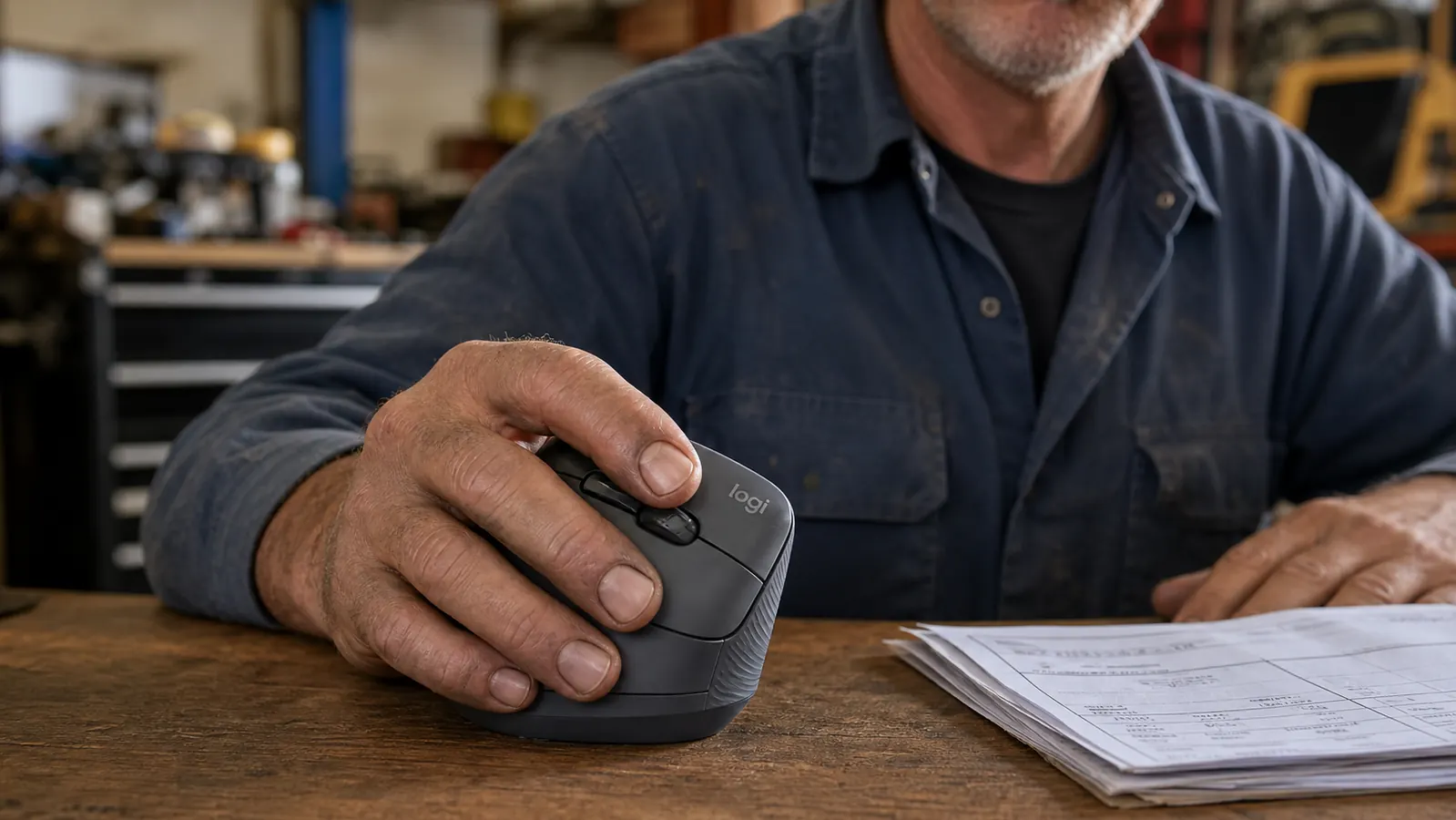
The whole point of the Lift is that your forearm and hand form a straight line, like you are shaking hands with the desk instead of slapping it flat. The mouse sits at that handshake angle roughly fifty-seven degrees off the table, so your wrist does not twist sideways to reach the buttons. When I first picked it up, it felt a little odd, honestly. Your hand is used to being flat. But give it a day or two and the natural position takes over, because it really is the position your arm wants to be in when you are relaxed.
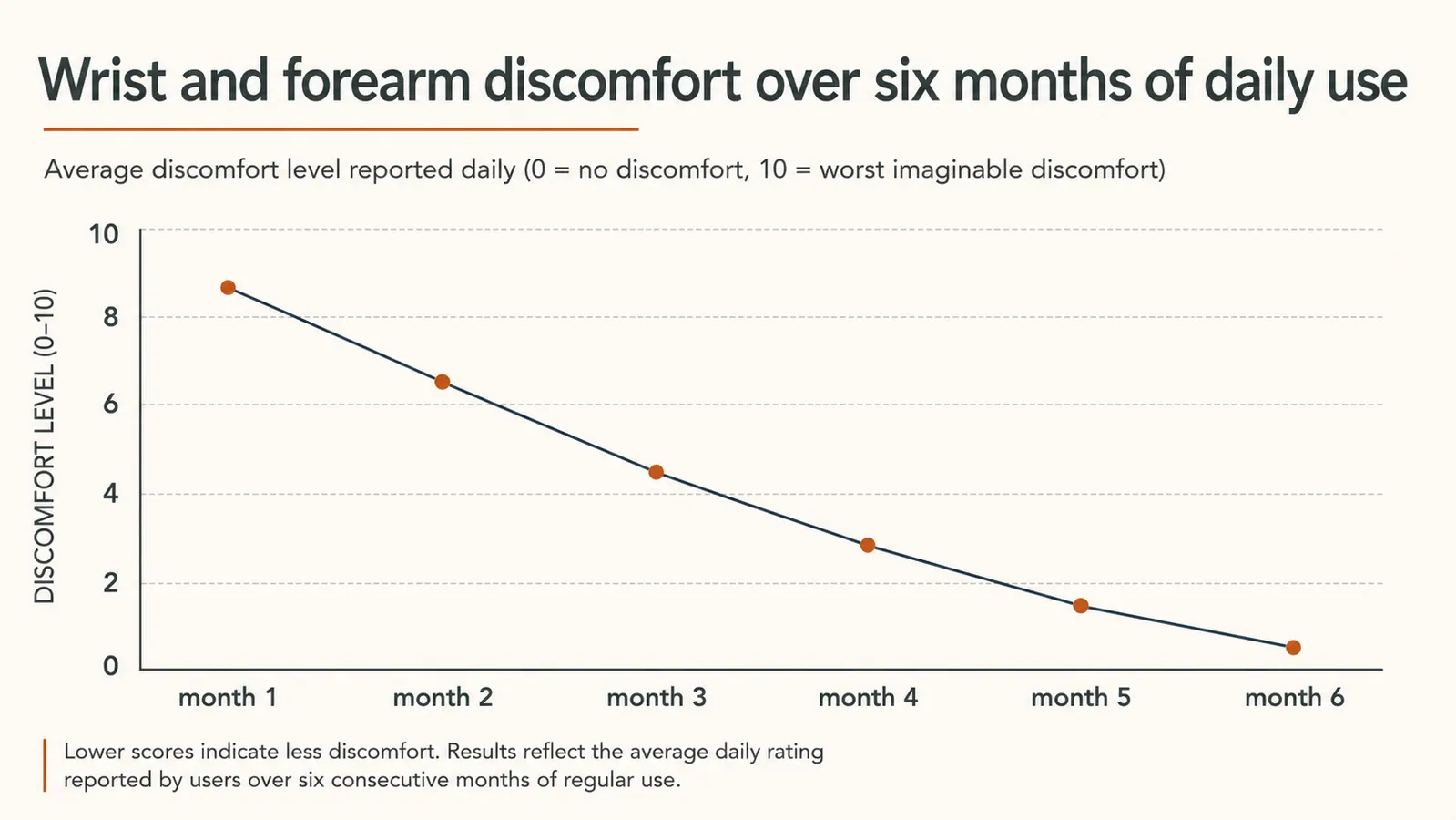
The change showed up on the bench, not on any chart. About three weeks in I noticed I stopped shaking out my right hand at the end of the day, that little automatic twitch you do to loosen a tired wrist. I had been doing it without thinking and one evening it just was not happening. That was the first sign the vertical angle was doing its part, and it kept up through the whole six months.
Is it a cure for anything? No, and I would not tell you it is. I still get a little tired on my worst days, and some of that is just sitting too long in one spot. But the twist in my forearm is gone, the thing that made the ache creep up the same way a hamstring knot creeps up when you set your foot wrong. It took the strain off the tendons that were getting hammered, plain and simple.
Fit: Built for a Working Hand
The Lift is a smaller ergonomic mouse, sized for a medium hand, and my hands have spent thirty years around wrenches so they are not small. I was worried a vertical mouse built for an office worker would feel like a toy in my grip. It does not. The shape fills my palm, my thumb tucks into the little thumb rest, and I can reach both buttons and the scroll wheel without stretching. It feels like a handle that was shaped to fit a hand, which is exactly the standard I judge anything by.
The body has a soft rubbery coating that gives you a good grip even when your hands are not exactly clean, and for me that matters. I am not one to stop and wash up every time I take a call. The coating does not get slippery and it does not pick up grease the way a glossy mouse would. After six months it still has the same texture it had the day I unboxed it, no shiny worn spots where my fingers rest.
One honest fit note. If you wear a big work glove, or you have hands on the XL side, the Lift may run a touch small for you. Logitech makes the bigger MX Vertical for larger hands, and that is the one I point big-handed friends toward. For a normal working hand, the Lift fits like it was measured for it.
The Daily Grind: Clicks, Scroll, and Staying Power
I do not need a flashy mouse. I need one that clicks the same on the thousandth time as it did on the first, because I type a lot of line items and I scroll through a lot of price lists. The Lift's buttons have a firm, quiet click to them, and they have not softened or started double-clicking through six months of steady orders. Same story with the scroll wheel. It steps through lists cleanly, no skipping, and the click-down on the wheel is solid.
There are two extra buttons on the side, at the thumb. By default they act as back and forward, and on the job they are the best thing on the mouse. I flip between the parts catalog and the order form all day, and being able to bounce back and forth without hunting the on-screen arrows saves me a surprising number of hand motions. Most guys will never program a single macro and do not need to. I have not touched the software beyond setting those two buttons, and that has been plenty.
Precision is where a real tool earns its keep, and the Lift tracks steady. I have used it on a bare wood desktop and on a plain cloth pad, and the cursor does not wander or jump. For someone coming from a flat mouse, the only real adjustment is that it is lighter, so you glide it around and let the tracking do the work instead of muscling it. Took me a couple of days to stop over-correcting, then it was second nature.
What Wore On Me Over the Long Haul
I said this earns its place on the bench, and it does, but I will not sit here and tell you it is perfect, because no tool is. The first thing is the learning curve. The vertical angle feels wrong for a couple of days, and on day one I honestly wondered if I had wasted my money. It settles fast, but if you only give a mouse a weekend, you might give up right before it clicks for you. Stick with it past the first few days.
The second thing is the position of the pair of small side buttons can be a pain if your thumb is thick. Mine works them fine, but a guy with heavier thumbs has to reach a little. It is not a dealbreaker, just a nudge to try it before you commit if you can.
And the honest truth is, a vertical mouse fixes the angle of your hand, and that alone does a lot. But it is not magic. If you sit too low, or your chair is wrong, or you lean on your forearm all day, no mouse will save you. I fixed my elbow height the same week I swapped the mouse, and I would tell anyone with wrist trouble to check that too. The mouse is the tool, but the setup around it still has to be right.
What Else I Nearly Bought
Before I settled on the Lift, I looked at the obvious alternatives, because that is how I buy anything. The big one is Logitech's own MX Vertical, the larger vertical mouse. I came close to grabbing it, but it is built for a bigger hand than mine and I found the Lift a better fit for a medium grip and lighter on the wrist for a full day of orders. A trackball was the other direction I considered, the kind you roll with your thumb. Those are genuinely beloved by a lot of folks, but moving my hand less is not the same as resting it more, and I wanted the handshake angle, not a different way of pointing at the screen.
What decided it for me was the same thing that decides any tool purchase: does it do the one thing I need it to do, day in and day out, without me thinking about it? The Lift did that the fastest and cost the least hassle to set up, and six months later it is still sitting in the same spot doing the same job. I have not once felt the need to dig a different mouse out of the drawer.
What I Liked
- Handshake angle takes the twist out of the forearm for good
- Firm, quiet clicks that still feel new after six months of daily use
- Solid grip, good even with not-clean hands
- Two thumb buttons that make back-and-forth work faster
- Easy to set up with no software fuss
- Steady, reliable tracking on plain desks
Where It Falls Short
- Takes a few days to get used to the vertical feel
- Runs small for very large hands
- Shorter battery span than its bigger brother; needs an occasional charge
Three weeks in, I realized I had stopped shaking out my right hand at the end of the day. That is when I knew the angle was doing its part.
Who This Is For
This mouse is for anyone who does a few solid hours of clicking a day and has started to feel it in the forearm, the wrist, or the side of the hand. If you are setting up a home office for the first time and you already suspect the way you hold a flat mouse is not doing you any favors, the Lift is a cheap insurance policy compared to the toll a bad angle takes over a year. It suits a normal working hand, it holds up to daily use, and it does not need any tech fussing to do its job.

Who Should Skip It
If you have very large hands, you will be better off with the bigger MX Vertical, because the Lift is built for a medium grip. And if you only touch a mouse twenty minutes a day, you may not notice enough of a difference to bother. Above all, if you are not willing to give it a week of the odd feel while your hand settles into the vertical angle, this is not the mouse for you, because you will judge it by day one and toss it before the real benefit shows up.
A Little More Reading
If you are weighing whether the handshake angle is worth it for you, I walked through how the Lift stacks up against a classic flat mouse side by side. And for anyone still on the fence about the whole idea, I put together the ten reasons a vertical mouse saves your wrist on a long day at the desk, which covers the long-haul math in plain terms.
Six months of daily orders, and my forearm stopped its daily complaining.
The Lift is the handshake angle that held up through real daily grind, not a weekend. If a flat mouse has your wrist twisted up, check today's price and give the vertical angle a fair week.
Amazon Check Today's Price on Amazon →