

I'm going to tell you the part the ads skip. About three months into running my home office out of the garage, my right forearm started complaining every evening. I'm a heavy equipment mechanic by trade, so my hands know hard work. This wasn't the good kind of tired after a long day on a loader. This was a dull, nagging ache that started at the wrist and crawled up toward my elbow, and it showed up right around the same time every night, after I'd spent the day hunched over a desk doing parts orders, invoices, and video calls with suppliers.
The flat mouse I was using was the problem. I had just moved my paperwork into the garage because the kitchen table wasn't cutting it, and I'd grabbed whatever cheap mouse was kicking around. After five or six hours a day with my wrist twisted flat against the desk, grabbing at a little plastic puck, my forearm was telling me I needed to do something different. That's how I ended up with the Logitech Lift vertical mouse, and six months later I have opinions. Good ones, and a couple you won't find in the marketing.
The Quick Verdict
The Logitech Lift is the single best fix I found for the forearm ache from a flat mouse, and it rides on a AA battery for months, but the quiet-click claim is oversold and it rewards a small hand more than a big one.
Amazon Check Today's Price →If your wrist aches after a long day at the desk, this is the fix worth trying
Six months in, the lift angle on the Logitech Lift is the reason my forearm quit complaining. It's the first thing I'd hand to anyone setting up a home office who spends real hours on a mouse.
Amazon Check Today's Price on Amazon →How I've Used It
Before I get into it, here's the setup so you know my use is real. My desk is a 2x4 top on sawhorses I built in the garage, sitting on concrete with a folded shop rug under it. Dozer, my bulldog, sleeps on the old stadium blanket about four feet away and watches me work. I run the Lift paired over Bluetooth to a mid-range laptop, and I use it an honest six to eight hours a day, five days a week, on parts orders, spreadsheets, emails, and the occasional video call.
So this isn't a review from a week of light browsing. This is six months of daily use, including a stretch where my click count had to be in the thousands some days. That matters, because the two things that wear out or annoy a mouse, the switches and the comfort, are exactly the two things a long-term review will actually show you.

What Nobody Tells You Before You Buy It
The honest truth is the Lift does what it promises, and I'd buy it again. But there are four things I wish someone had told me before I ordered it. Most reviews are written in the first week, when everything feels new. Here's what the first week won't tell you.
First, the quiet-click claim is real in volume but not in feel. The switches are physically quiet, quieter than any mouse I've owned, and in a quiet garage you notice it. But quiet does not mean soft. There's still a solid, tactile click, and if you were hoping for something mushy and silent like a laptop trackpad, that's not what this is. Nobody tells you that the quiet part is about decibels, not about feel.
Second, the hand fit is not universal. The Lift is sized for a small to medium hand. My mitts are wide from years of swinging wrenches, and my hand hangs a little off the side. It's still comfortable, more comfortable than any flat mouse, but if you have big hands, the bigger Logitech MX Vertical is the one you actually want. The Lift is the small-to-medium version of the same idea.
The Battery: The Part That Surprised Me Most
Here's the thing nobody brags about because it's not flashy. The Lift runs on a single AA battery, not a rechargeable one, and that battery lasts months. I put mine in at the end of January and replaced it around the first of July. That's roughly six months, on daily eight-hour use, with the pointer set to a moderate speed and no aggressive power-saving fiddling on my part.
I like this a lot more than I thought I would. A rechargeable mouse sounds better on paper until the battery ages and you're tethered to a cable for an hour in the middle of the day. With the Lift, I keep two spare AAs in a drawer with the rest of my shop batteries, and a swap takes under a minute. There's a low-battery warning that tells you weeks ahead, so there's no surprise dead mouse. For a guy who judges gear on whether it earns its place and stays out of the way, that single AA is a quiet win.
The one truth to know is that you should buy a good alkaline AA, not the cheapest bargain pack. A cheap cell will still work, but you'll be swapping it more often. That's not a knock on the mouse, it's just how batteries are.
Where the Comfort Actually Kicks In
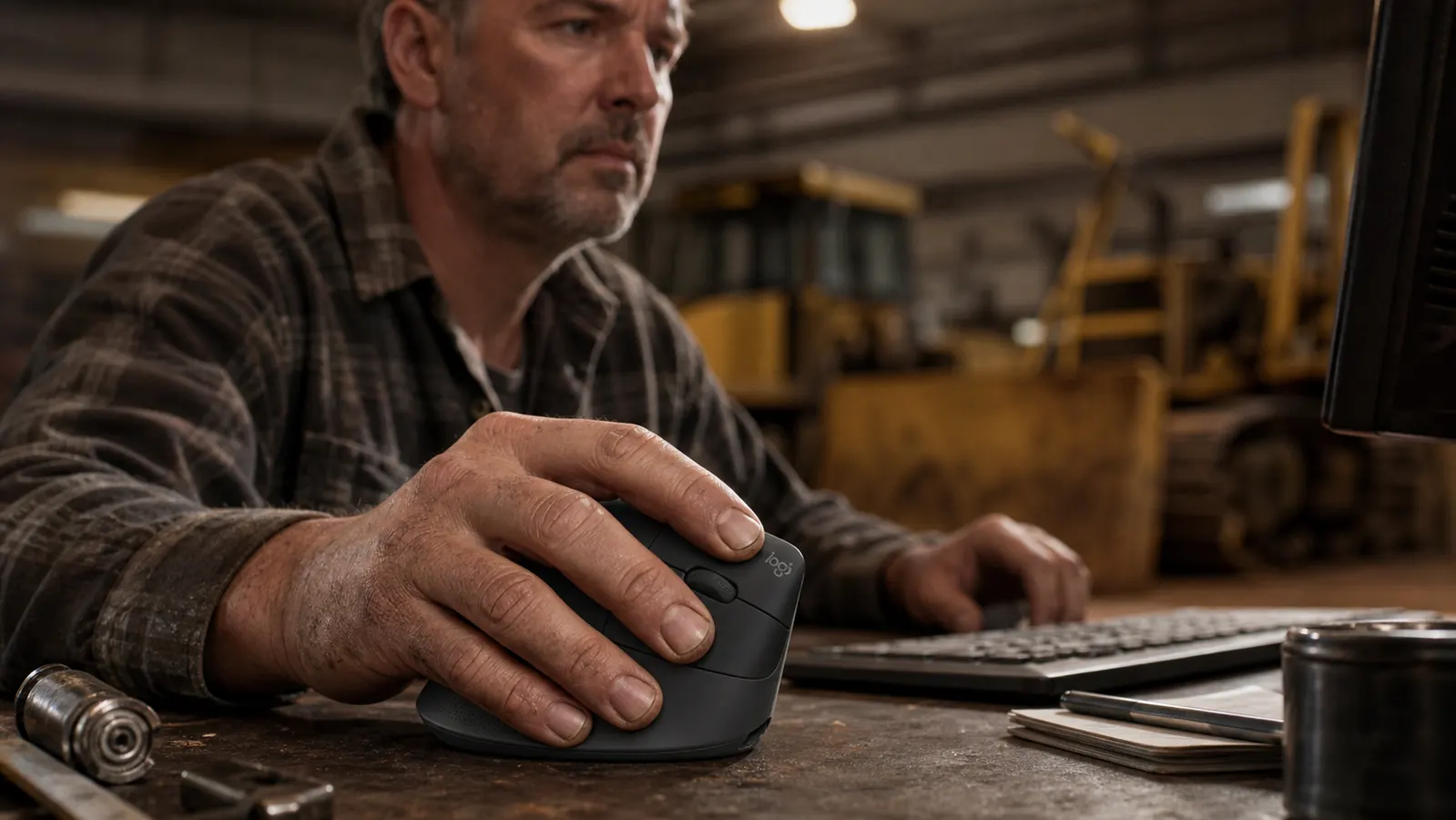
The whole point of a vertical mouse is that it turns your forearm instead of twisting it. With a flat mouse, your forearm is pronated, rolled so your palm faces down, and your wrist has to bend to steer the puck. Do that for hours and the tendons running up your forearm take the abuse. I know the mechanics because I fix things for a living; I've seen the same style of strain pattern in a wrist that's held twisted under a load all day.
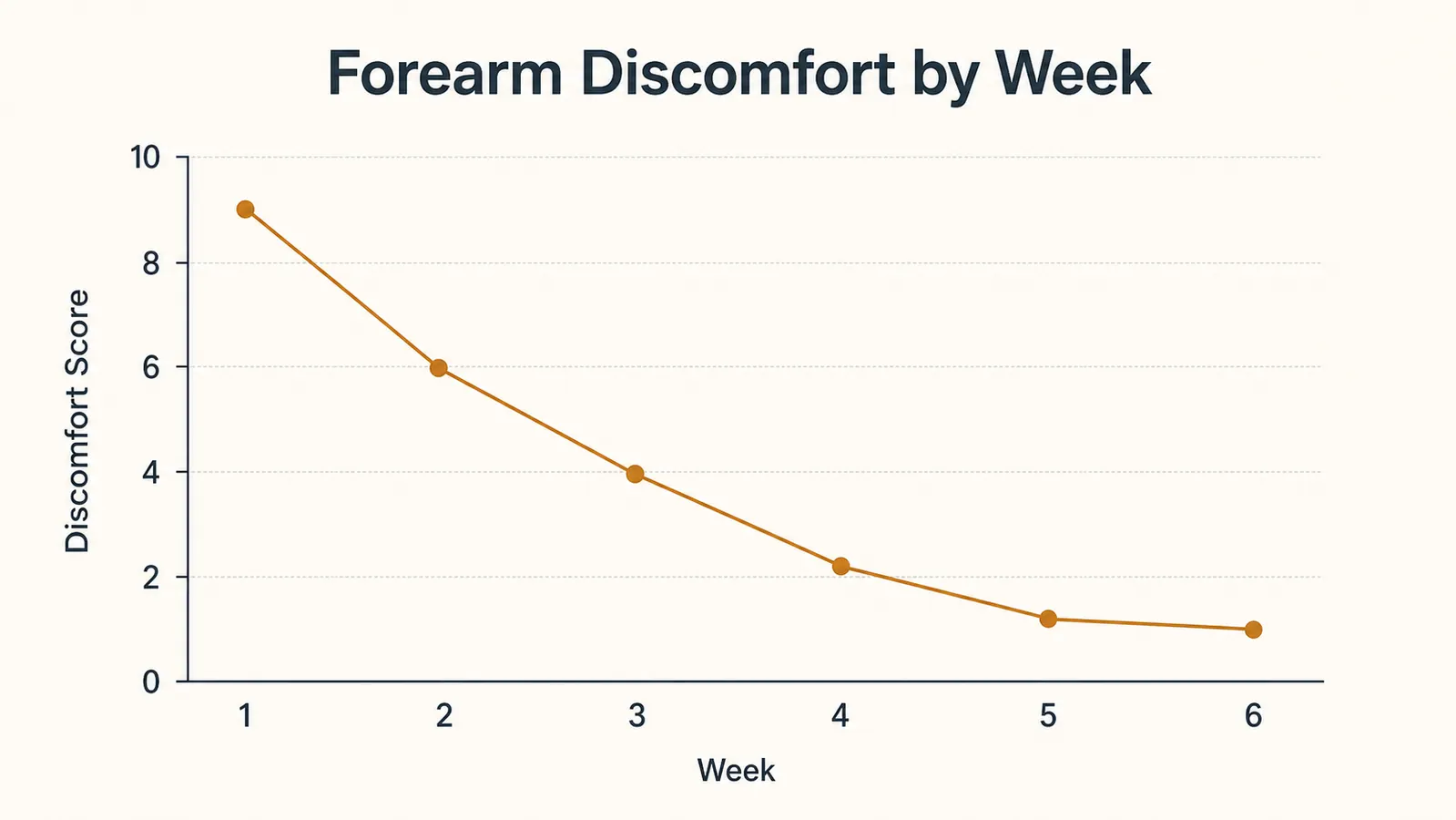
The Lift stands your hand up at about a fifty-seven degree angle, so your forearm sits in a more natural handshake position. Your palm and fingers close around it the way your hand already rests on a bench or a toolbox handle. That simple repositioning is what took the load off my forearm. Within about two weeks the evening ache was gone, and by a month in I stopped thinking about it entirely, which is the best compliment I can pay a piece of office gear.
It's not magic. If you've already got a serious wrist injury, a mouse is not a cure for that, and I'm not going to pretend otherwise. But for the everyday ache that comes from hours on a flat mouse, this repositioning is exactly the fix.
Within two weeks the evening ache in my forearm was gone. By a month in I stopped thinking about my wrist entirely, and that's the best compliment I can pay a piece of office gear.
The DPI Button and the Fiddly Bits
There's a pair of buttons on the side that act as forward and back, and a smaller round button near the scroll wheel that cycles through two pointer speed settings. I'll be honest, I used the two way buttons a lot for parts catalogs and invoice pages, and they're placed well under my thumb. The speed button I barely touch; once I set the pointer speed where I liked it, I left it alone.
Setup is genuinely easy for a non-tech guy like me. You put in the AA, pair it over Bluetooth, and it's working. There's also a Logi Bolt USB receiver in the box if you'd rather not use Bluetooth, and you connect via the Logitech software if you want to change the buttons. I did the whole thing with no fuss in ten minutes, and I'm the guy who still uses a pen and paper for half his job. That part of the experience is exactly as advertised.
One thing that took me a minute to get used to is that lifting the mouse off the desk to scroll wheel clicks into a shifter mode. I'm a mechanic, so I actually found it clever, but it does take a day to remember you lift to shift gears. Not a flaw, just a quirk you'll learn quickly.
What I Liked
- The vertical angle genuinely took the ache out of my forearm within two weeks
- A single AA battery runs six months, with a warning well before it dies
- Quiet enough that I don't wake Dozer clicking away at 6am
- Easy ten-minute setup, Bluetooth or the included USB receiver
- Solid build that feels like it'll outlast the desk it sits on
- Forward and back buttons sit right under the thumb
Where It Falls Short
- The quiet-click claim is about volume, not feel; it still has a firm, tactile click
- Sized for small to medium hands, so big hands hang off the side
- Only two pointer speed settings unless you install the software
- Takes a day to learn to lift-to-shift the scroll wheel
The Other Options I Tried Before I Landed on This One
Nobody buys the first mouse they see, so let me be fair and tell you what else I tried, because it makes the Lift's strengths clearer. Before this, I ran a trackball for a couple of weeks, thinking it would change the game for my forearm. It didn't. The trackball kept my wrist still, sure, but my thumb did all the work, and within a few days my thumb joint was the sore thing instead of my forearm. If you're coming from a painful wrist, a trackball just moves the ache somewhere else.
I also tried just lowering my desk and propping the laptop higher, thinking posture was the whole fix. That helped my neck a little, but it didn't touch the forearm strain, because the flat mouse was still twisting my wrist all day. The lesson I took from it is that the mouse is the part of the setup your wrist actually spends all day on, so it's the part worth getting right. The Lift does what a keyboard stand does for your neck, but for your forearm, and neither one can be replaced by a better chair.
So if you're weighing a trackball against a vertical mouse, my honest vote goes to the vertical mouse for daily office work. A trackball has its place, especially if you work in tight quarters, but for hours of pointing and clicking on parts orders and invoices, the handshake angle of the Lift is the more natural fit. That's what six months of real use told me, and it's a fair thing to know before you spend your money either way.
Who This Is For
Get the Logitech Lift if you've started to feel that dull ache in your forearm or wrist after long days at a flat mouse. That's the whole reason vertical mice exist, and this one does the job well. It's also a great first vertical mouse if you're setting up a home office for the first time and aren't a tech person. The setup is genuinely painless, the battery stays out of your way for months, and the smaller hand size makes it approachable for most people who don't have basketball-player palms.
If you're coming from a flat mouse and wondering if you'll be miserable during the switch, here's the honest answer. The first day feels slightly odd, like holding a tool differently than you're used to. By day three it feels natural, and by the end of the first week you won't think about it at all. That transition is a lot easier than the marketing makes it sound, because your hand actually settles into a resting position instead of hovering and twisting.
One thing I want to add before I close it out. The Logitech Lift taught me something about my own posture that I would not have listened to from a stretching app or a video guru. When my forearm stopped hurting, I noticed I was also sitting up straighter, because the angle of the mouse forced my wrist into a position that pulled my elbow in, which pulled my shoulder down. I did not buy the mouse for my posture. I bought it for my wrist. But the posture came with it, and I am not complaining.
Set your hand up the way it wants to rest, not the way it's been twisted
If the forearm ache is real, the fix is repositioning, not more ibuprofen. The Logitech Lift earned its spot on my bench, and it's the first thing I'd recommend to anyone building a home office.
Amazon Check Today's Price on Amazon →Who Should Skip It
Don't buy the Lift if you have noticeably large hands. The Lift is built for small to medium hands, and if yours hang off the side, look at the bigger Logitech MX Vertical instead. Same idea, larger body. The difference matters over hours of use, and it's the one sizing mistake I'd warn people about before they order.
Skip it if you were sold on the quiet-click pitch as a soft, silent, no-feel button. The Lift is genuinely quiet at a normal speaking volume, and you can click away without waking the dog or bothering someone in the next room, but the switch still has a crisp, firm click under your finger. It's quiet, not soft. If you specifically want that mushy silent trackpad feel, this isn't it.
And if you've got an existing, diagnosed wrist injury, don't expect the Lift to be a cure. It eases the everyday strain from a flat mouse, which is a real thing, but it's not physical therapy. If your wrist is already hurt, get it looked at. I'd rather you hear that from a guy on a garage stool than find it out the hard way.
Here's my bottom line after six months. The Logitech Lift is a well-built tool that does exactly the one job it's made for, and it does it without getting in the way, which is how I judge everything that sits on my bench. It took the ache out of my forearm, it runs for months on a single AA, and I'd buy it again tomorrow. Just know the quiet-click is about noise and not feel, and check the hand size before you order. Get those two things straight, and you'll be as glad you made the switch as I was.