

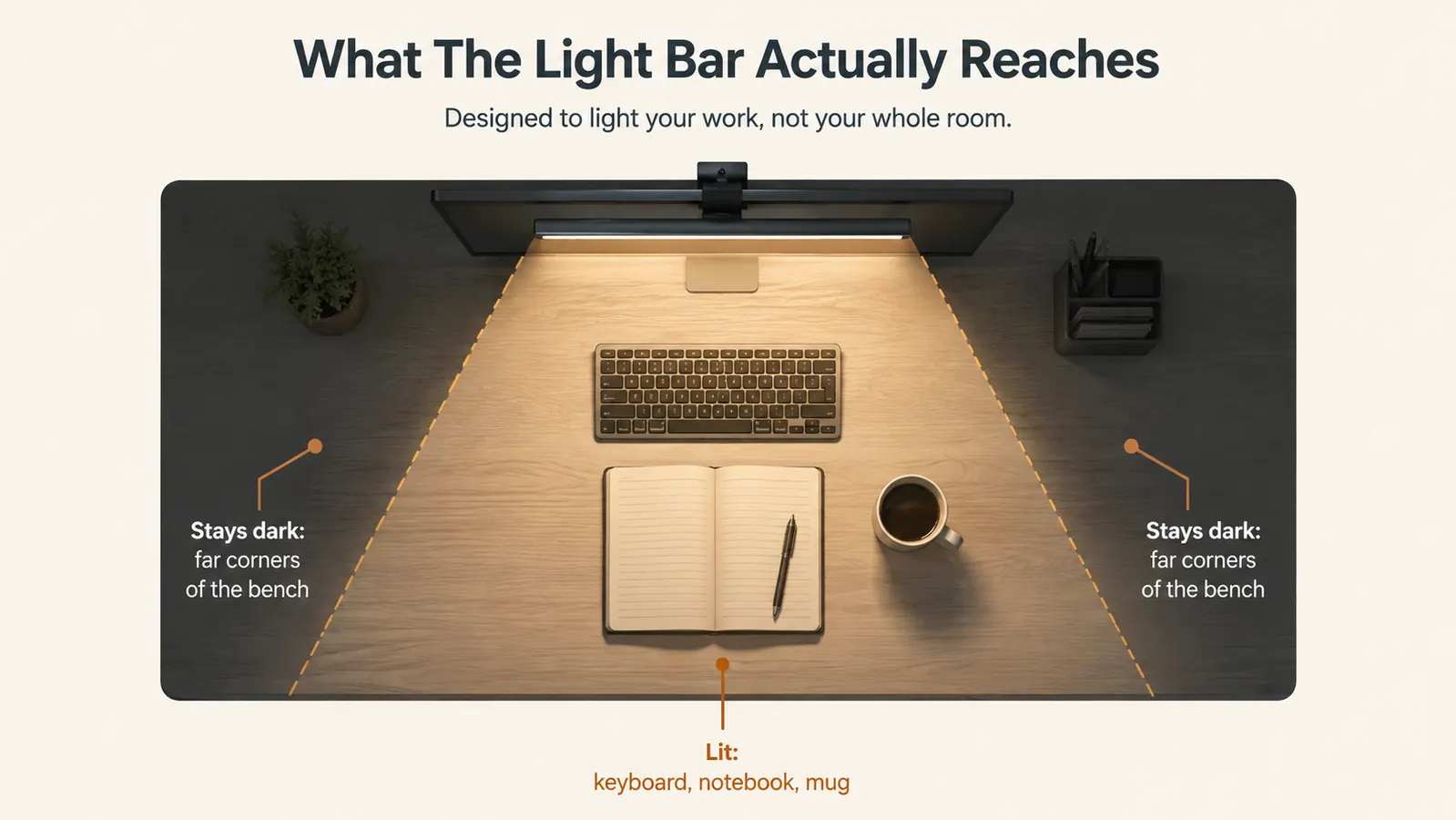
Let me start with the thing nobody puts on the product page: a monitor light bar does not light your room. It lights a wedge of desk in front of your screen, and only that. I found this out the honest way, by setting up the Quntis bar in my garage office and realizing the rest of the bench stayed dark afterward, and I'd rather tell you that upfront than have you be the one surprised by it. I'm Walt, I fix heavy equipment for a living, I build old hot rods on the side, and this desk in the corner of my converted garage is the first real office I've ever had.
I bought the Quntis monitor light bar for one reason and one reason only: my glossy screen showed me my own reflection and the glare of a bare shop bulb all night, and it was wearing my eyes out by nine o'clock. This is not a review written fresh out of the box. I've been running this bar for months now, five and six nights a week, usually late, with my bulldog Dozer snoring on a scrap of cardboard by the desk leg. Since a lot of what gets written about these bars makes them sound like they hang light on everything in reach, I figured I owed you the version that tells you what they really do and where they fall short. If you're still deciding whether this kind of light is worth a spot on a first-time home office desk, I've also written the longer story of my first year with it: my Quntis monitor light bar long-term review fills in the durability side of it.
The Quick Verdict
It does exactly one job, and it does that job better than anything else on my desk: it gives you clean, even light across the working surface without throwing glare onto your screen. The brightness is plenty for reading and paperwork, the mount fits normal monitors well, and it's built like a real tool. Where it falls short is the hype around the auto-dimmer, which you'll likely switch off, and the narrow beam that leaves the corners of a big desk dark. Still, I'd buy it again tomorrow.
Amazon Check Today's Price →Sick of Seeing Your Own Reflection in the Screen Every Night?
This is the bar that finally gave my tired eyes a clean pool of light to work in. It doesn't light the whole room, but it lights the desk where the work happens. Check today's price and current availability on Amazon.
Amazon Check Today's Price on Amazon →How I've Used It
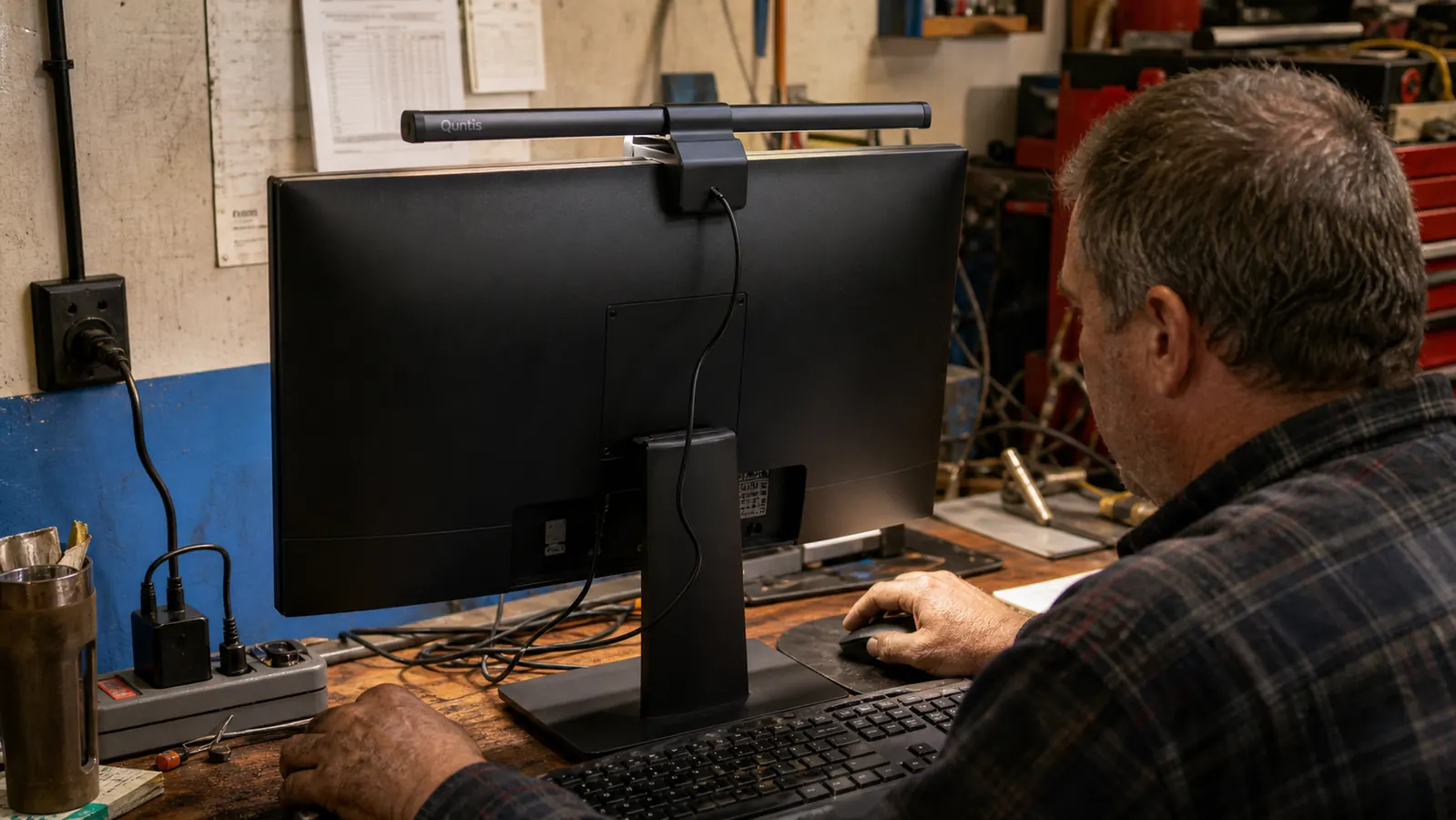
My desk is the top of an old workbench I salvaged and leveled in the dry half of my garage, the same concrete-floored space where I wrench on cars during the day. I'm not a tech guy and I don't pretend to be. I run my laptop up on an aluminum stand, I print or read parts orders on paper, and I get most of my actual work done on the keyboard and in a notebook off to the right. The Quntis bar rides across the top of an older 24 inch monitor I've had for years, and it's been there, plugged in and quietly working, since the day I mounted it.
What I actually do under this light is plainer than the marketing suggests. I read fine print on parts diagrams, I fill out order forms, I sit in a video call with a supplier or a customer while I sketch out a hot rod build, and I do it all late, because the daytime belongs to the shop. So the bar is on for long stretches of the night, not glowing in a showroom. That's the test it had to pass, and I want to be clear that this review is about that kind of real, everyday use, not a weekend novelty.
The Honest Read on Brightness
Here's where the marketing and the reality part ways, and I wish more people would say it plainly. A monitor light bar is a task light, not a room light. The advertising shots make one look like it softens the whole office into a warm, even glow. It does not. What it does is throw a directed wedge of light that lands on the desk directly in front of the screen and falls off fast. My keyboard, my paperwork, and my coffee mug all get lit nicely. The far corners of the workbench, my tool chest across the room, all of that stays in the dark.
Is that a problem? For my use, no. Most of what I do at night happens right there in front of the screen, and that's where the light lands. But if you picture a bar like this lighting a whole workspace the way a good overhead light would, you're going to be disappointed, and I'd rather you hear it from me than find out after you unbox one. If you want to see how this compares to a lamp that throws a wider beam, I've written a straight comparison: my piece on the Quntis monitor light bar versus a desk lamp walks through what each one actually reaches.
Within that narrow wedge, though, the brightness is genuinely good. There's a dial at the end of the bar that ramps the light from a warm amber down to a cooler, brighter white, and a separate knob for how bright it runs. I keep it on the warm side most nights because it's easier on tired eyes, and I bump it bright and cool when I'm squinting at a fine-print wiring diagram. I've never once run it on full and thought I needed more, which is not something I can say about a lot of the cheap clamp lamps I've owned over the years.
The Build Quality Nobody Mentions
In my line of work I've watched a hundred cheap gadgets fall apart inside a year, so I always size up the material before I trust a tool, and the Quntis bar is one of the more honest builds I've unpacked at this price point. The body is aluminum, not the thin shiny plastic a lot of bargain electronics use to fake quality. It's light on the mount but solid in the hand, with no flex when you tilt the angle, and the rubber pads on the clamp have stayed soft and whole instead of going hard and cracking the way cheap rubber does in a hot, dusty garage. The finish hasn't flaked where my fingers hit it every night.
The attention to small details is what sold me as much as the light itself. The clamp is counterweighted so it balances on the monitor instead of squeezing it, the touch controls sit cleanly on top, and the whole thing has a deliberate, thought-through feel to it. You can tell somebody who actually uses one of these designed it. That's the difference between gear that earns its place on the bench and gear you end up tripping over in a drawer six months later.
Which Monitors It Fits, and the Mount Reality
The mount is a counterweighted clamp that grips the top edge of the screen and hangs the bar out over the desk. It does not squeeze the bezel like a vice. It balances on top of the monitor with a weighted arm pressing down on the back of the screen. That design is exactly why it's been rock solid for me, but it comes with a catch people don't always think about: it needs a monitor with a reasonably flat back and a top edge thick enough to hold the clamp. On my older, flat-backed monitor it sits perfectly and hasn't budged in months. On a curved monitor or one of those ultra-thin frameless panels, it can be a different story.
The honest part is that whether it fits depends on your specific screen, and you won't know for sure until you try it. My neighbor borrowed mine for an afternoon to try it on his modern thin-bezel monitor, and the clamp balanced all right but the rubber pads sat a little proud of the top edge. It worked, but it was fiddlier than on my older screen. If your monitor has a smooth, flat top and back, you're in the sweet spot. If yours is curved or frameless, take a hard look at the Quntis package before you commit, because a mount that half-fits will always feel like a compromise.
The other mount reality, and I'll own up to it because it's a small thing that's easy to miss: there's a power cable involved, and it has to go somewhere. The bar is USB powered, and the cable runs off the end of the bar, down behind the monitor, and into either a USB port or the included wall adapter. If you're neat about your desk, you'll want a cable clip or a bit of double-sided tape to tuck it out of sight, because left to itself it hangs right where you can see it. It's not a reason to skip the bar. It's just one more honest thing they don't put in the product photos.
The Auto-Dimmer Is Not the Selling Point
The listing makes a fair bit of noise about the auto-dimming feature, where the bar reads the light in the room and adjusts its own brightness to match. Most people probably assume that's a headline feature worth paying for. Here's the honest truth from a guy who's run it for months. The sensor sits on the bottom of the bar, aimed down at the desk and, unavoidably, at a good chunk of the screen itself. So when the screen got bright, the bar dimmed itself, and when the screen went dark on a video call or a black webpage, the bar cranked back up.
In a room with steady lighting and a static screen, the auto-dimmer probably works fine and nobody complains. In my garage, on a work screen with windows opening, videos playing, and bright parts diagrams popping up, it flickered along like it was reacting to whatever happened to be on the monitor at that second. I turned it off inside of a week and I've run the bar on manual brightness ever since. It's a fine convenience to have in the way it speaks to the thought they put into the design. But if you're buying this bar specifically for the auto-dimmer, take that expectation down a notch.
I want to be fair, because it's easy to read that as me hating the feature. I don't. It's just that it doesn't match every workspace, and the parts of this light that actually changed my nights, killing the glare and lighting the desk, work just as well with the auto-dimmer switched off. I'd rather you buy the bar for what it genuinely nails, and treat the auto-dimmer as a maybe, than buy it for the headline feature and feel let down.
What I Liked
- Kills screen glare and your own reflection better than any lamp I've tried in a dim room
- Genuinely even, stepless brightness from warm amber to cool white, plenty for reading and paperwork
- Counterweighted clamp has held solid for months with zero re-tightening on a flat-backed monitor
- Aluminum body and rubber pads built to survive a hot, dusty garage without degrading
- Small and out of the way, frees up desk space a lamp would eat, and runs cool enough to leave on
Where It Falls Short
- Only lights a narrow wedge in front of the screen, the rest of the bench stays dark
- Mount fit depends on your specific monitor, curved and thin-bezel panels are fiddly
- Auto-dimmer reacts to what's on screen and flickers, most people will switch it off
- The power cable needs managing or it hangs visibly behind the monitor
It doesn't light the room, and the sooner you accept that the more you'll appreciate what it actually does. It lights the desk where the work happens, and it does that without ever shining in your face off the screen.

What a Day of Use Is Really Like
Let me give you a plain Tuesday so you know what you're actually signing up for. I come in from the shop around six, my hands cleaned up after the last job, and I sit down at the desk as it gets dark outside. The bar is already there, mounted, one flip of the switch and the wedge of light comes on over my keyboard and my open notebook. I answer emails from parts suppliers, I type up estimates for a couple of hot rod customers, and I read fine print off the screen and the paper in front of me without having to squint or move the paper toward a lamp.
Around nine, if it's a cold night, I'll shut the overhead shop light and work by just the bar and the glow of the monitor. That's the moment that sold me on this thing. The room goes dark and quiet except for Dozer snoring, and the desk stays lit exactly where I'm working, and my eyes don't get that gritty, tired feel I used to have by the end of the night. It's a small tool and it doesn't look like much on the listing, but it earns its place on the bench, and that's the standard I judge any piece of gear by.
Who This Is For
This bar is for somebody working at a screen in a room where the lighting fights them. If you've got one harsh overhead bulb, a reflective screen that shows you your own face all night, or a dim corner of a house where you've set up a desk, this is the fix. It's especially right for someone setting up a first home office on a budget, the way I was, who wants clean, even light right where the work happens without buying a whole lighting rig or giving up desk space to a lamp arm. If you spend your evenings reading, ordering, or doing paperwork at a monitor, you'll feel the difference the first night it goes on.
Who Should Skip It
Skip it if you're hoping for a light that fills a whole room, because this is not that, and you'll be disappointed acting like it is. Skip it if your only computer is a curved or ultra-thin frameless monitor and you're not willing to fuss with a mount fit that might sit a little awkward. And if your office already has an even, glare-free ceiling light that does the job, you may not notice enough of a change to justify adding one more wire to the bench. But for anyone fighting a glossy screen in a dim room, and especially for a first-time home office builder who wants their desk lit without lighting the whole shop, this little bar is worth its weight. It earned its spot on my workbench, and it's not going anywhere.
Want a Clean Pool of Light Without Lighting the Whole Room?
Months in, this bar still sits on top of my monitor every night and does the one thing I needed it to do. It kills the glare and lights the desk where the work happens. Check today's price on Amazon and see if it's in stock.
Amazon Check Today's Price on Amazon →