

The night I finally bought the Quntis monitor light bar, I was squinting at a laptop screen through the reflection of a single bare work light hanging over my makeshift desk in the garage, and I'd had enough. The office got set up because the shop started taking video calls with parts suppliers and a couple of my hot rod clients, and the kitchen table wasn't going to cut it. But the garage was lit like a shop, not a place to work on a screen. One harsh bulb overhead, dust in the air, and every time I looked at the display it threw my own reflection and the bulb's glare right back at me. By nine o'clock most nights my eyes were done for the day.
I'm not a tech guy and I don't pretend to be. I judge gear the way I judge a wrench: does it hold up, is it built right, does it earn its place on the bench. So I didn't want a ring light with a bunch of modes I'd never use. I wanted a clean light over the working surface that quit bouncing off the screen, and I wanted it to not fall apart. The Quntis monitor light bar, the one that clamps across the top of the monitor, is what I settled on after a fair bit of looking. This is the honest read after a year of near-nightly use, not a fresh-out-of-the-box opinion.
The Quick Verdict
A year in, the Quntis monitor light bar is the single most useful piece of gear on my desk. It killed the glare on my screen and gave me a clean pool of light to read parts orders by, and the clamp has held firm through a full year of use. It's not perfect. The auto-dimmer is finicky, and the touch controls sit where my hand keeps brushing them. But I'd buy it again tomorrow.
Amazon Check Today's Price →Tired of Squinting at a Glaring Screen Every Night?
A year of nightly use and this light bar still hasn't left my desk. It's the fix for a screen that throws your own reflection back at you in a dim room. Check today's price and current availability on Amazon.
Amazon Check Today's Price on Amazon →How I've Used It
My desk lives in the converted half of my garage, the same space where I build hot rods during the day. The concrete floor is still concrete, the smell of WD-40 never quite goes away, and Dozer, my bulldog, parks himself on a piece of cardboard next to the desk leg most nights and snores through my whole shift at the computer. The office part of it is a plain big desk I built myself out of an old workbench top, a laptop on one of those aluminum stands, and, as of last year, the Quntis bar clamped across the top of my monitor.
My hours are not office hours. During the day I'm under a hood or on a lift, and the paper pushing and ordering happens at night, usually after dinner, sometimes until midnight or later if a part number is being difficult. That means the light bar is doing real work, hours at a stretch, five or six nights a week. It's plugged into the USB port on my monitor and it came with a power brick too, which I only ended up using after my laptop port got fussy. One wire, set it and forget it, that's how I like my tools.
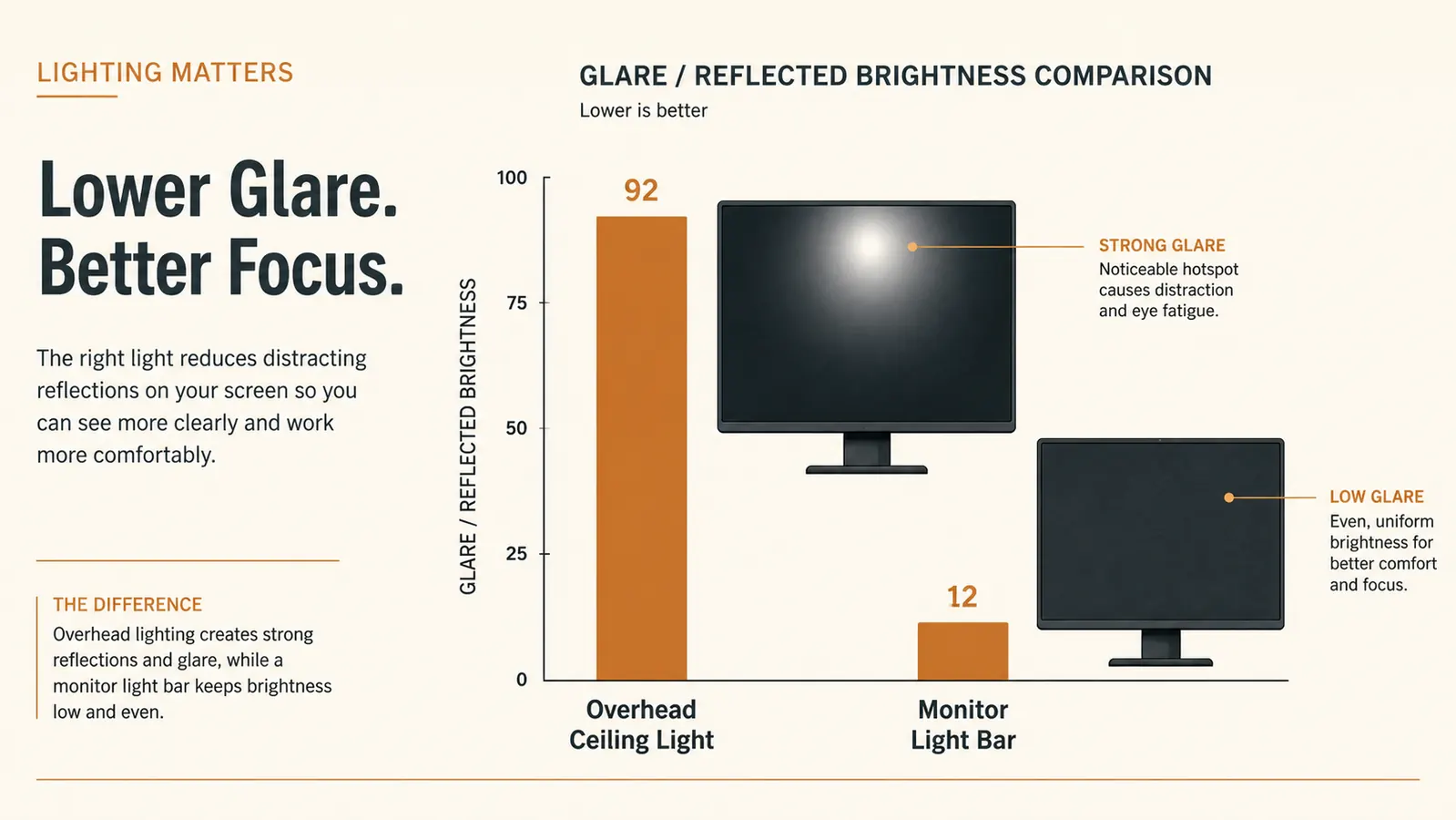
Before I put it on, the desk had one job and one light hanging over it, and the two didn't get along. The bare bulb lit the whole shop but put a hot glare spot dead center on my screen, and the monitor was glossy enough that I could see my own reflection and the light fixture behind me in it. I've got the full comparison written up if you're weighing a light bar against a regular lamp: my piece on the Quntis monitor light bar versus a desk lamp walks through why the bar won for me. The short version is that the bar sits so close to the top of the screen that it lights the desk without shining on the display at all.
The Clamp That Hasn't Budged in a Year
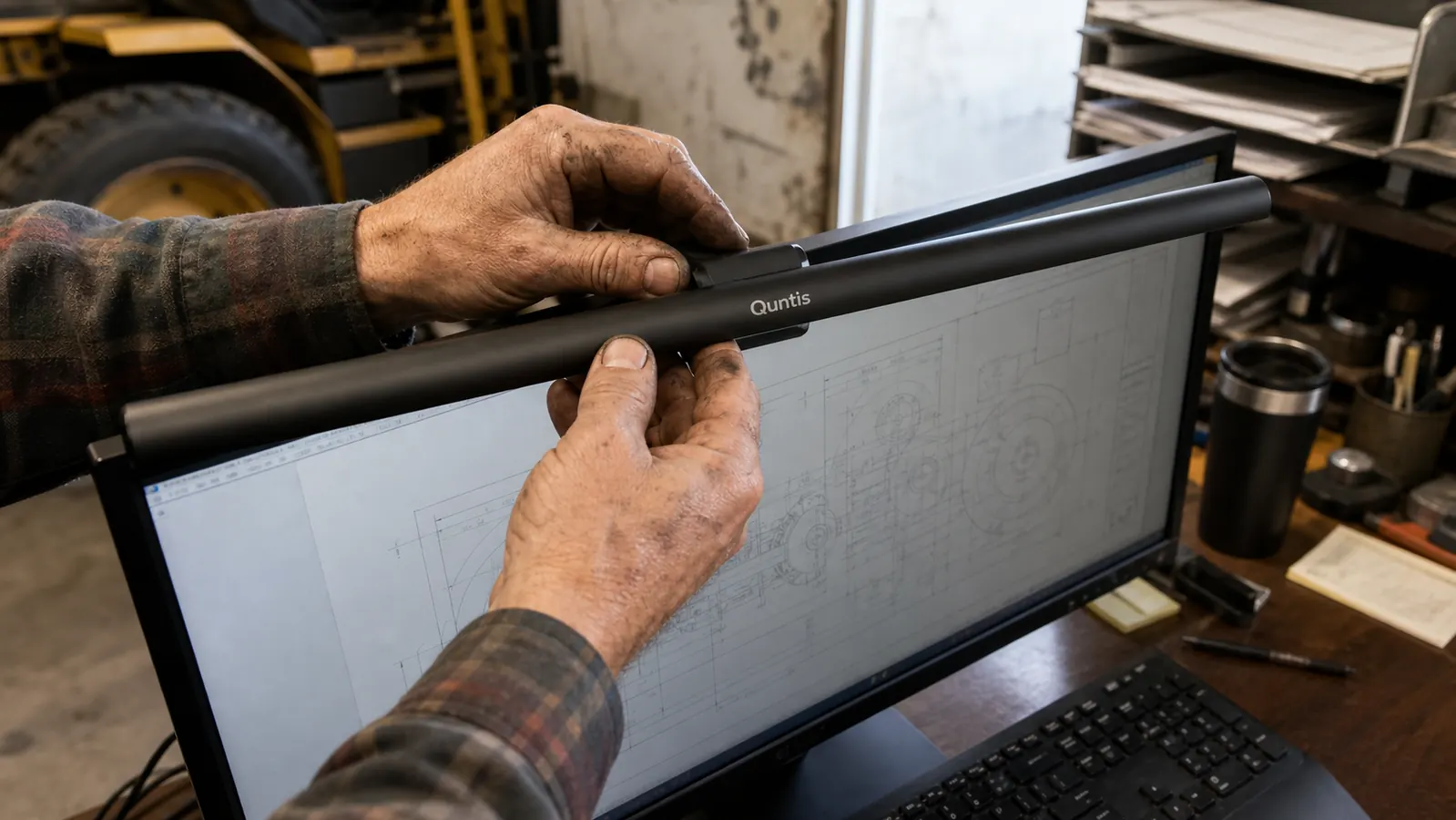
The first thing I checked when I unboxed it was the mount, because in my line of work I've watched a hundred cheap clamps strip out or work loose. The Quntis bar uses a counterweighted clamp that grips the top edge of the monitor, and it presses down on the back of the bezel rather than clamping on like a vice. That design choice means it doesn't depend on squeezing plastic hard enough to stay put, which is exactly the kind of thing that makes me trust it.
A year of daily mounting, adjusting, and moving it between the glass-top monitor and back has not loosened it. I take it off when I clean the screen, which is about monthly with garage dust in the air, and it goes right back on without needing to be re-tightened or fussed with. The rubber pads on the clamp haven't cracked or gone hard, which surprised me, because cheap rubber in a garage usually does within months from the heat and the oil mist in the air.
The bar itself is aluminum, which is the right material for the job. It's light on the mount but solid in the hand, and it doesn't feel like it's going to bend when you adjust the angle. The finish has held up too, no flaking, no scratching where my fingers hit it every night to tilt it down a touch further toward my paperwork.
What the Light Actually Does to a Screen
Here's the part that surprised me, because I expected a light sitting right there on the monitor to make the screen worse, not better. It does the opposite. The bar is asymmetric, meaning the light shines in a wedge that lands on the desk in front of the screen and falls off hard before it reaches the display surface. The result is that my screen got easier to read, not washier, and the overhead glare spot that used to sit in the middle of it is gone. On a glossy monitor in a dim garage, that's the difference between working and fighting.
The color temperature is adjustable, a warm amber at one end of the knob and a cool, almost white light at the other, with a dial at the end of the bar for brightness. I run it warm most nights because it's easier on my eyes at the end of a long day, and I only bump it cool and bright when I'm doing paperwork with fine print on a parts diagram that I need to actually see. The brightness range is wide enough that I've never once felt I needed more light than the bar can give, and I've never wanted less.
If you're just starting to set up a desk and wondering where to put your light, this is the one thing I tell people not to skip. It's inexpensive relative to the difference it makes, and it beats the pants off a ring light for this job. Anyone who spends evenings staring at a screen would get more out of reading my list of reasons a monitor light bar saves your eyes, which covers the glare math in plain language.
The Auto-Dimmer: Good Idea, Finicky Execution
This is where I have to be honest, because no tool is perfect and a review that only sings praises isn't worth the paper it's written on. The Quntis has an auto-dimming feature that reads the ambient light in the room and adjusts the bar's brightness to match. In theory that's great. In practice, in my garage, it is the one thing on this light that I mostly leave switched off.
The sensor is on the bottom of the bar, and it picks up light from the screen itself as part of what it's reading. When a bright scene came up on the monitor, the bar would dim itself down, and when the screen went dark, it would crank itself back up. The result was a light that flickered along with whatever was on screen, like a guest at a party nodding along to the music, helpful and well-meaning but not exactly what I wanted. If your office lighting is steady and you don't have much changing on screen, it might work fine for you. For me, on a work screen with constantly moving windows and video calls, I set the brightness by hand and leave it there.
I want to be fair about this, because it reads harsher than the reality. The sensor is a convenience feature, not the reason to buy the bar. The core job, killing glare and lighting the desk, it does that flawlessly every single night whether the auto-dimmer is on or off. I mark it down for being fussy, but it doesn't change the verdict on the light itself.
The Touch Controls and Other Small Gripes
The controls on the Quntis are touch sensors on the top of the bar rather than physical buttons, which looks clean but has one practical problem for a guy with my hands. Every now and then, reaching across the desk for a pen or a parts binder, I brush the top of the bar and the light flicks off or jumps brightness. It's a small thing, and it takes about a second to fix, but it's the kind of thing a bench guy notices because it shouldn't happen. A physical switch would have been sturdier and more in keeping with how I like my tools.
The other minor gripe is the power setup. It's USB powered, which is convenient, but it wants a decent power source. Plugged into a weak port it will run, but it can throw the brightness a little irregular. I ended up using the included power adapter plugged into a strip on my bench, and it's been rock steady since. Not a reason to skip it, just a heads up that you may want to give it a real power source instead of daisy-chaining it off an overloaded hub.
A Year of Staying Power in a Harsh Room
The thing I was most worried about, honestly, was whether a light bar would hold up in a garage. My shop gets hot in the summer and cold in the winter, the air is carrying fine metal dust from grinding, and there's a layer of oil mist that settles on anything left sitting out. I've watched cheap plastic gear get brittle and crack in that environment, and I half expected this bar to end up the same way. It hasn't. The aluminum body and the rubber pads are all still in one piece, and the LED strip inside is as even and bright as the day I mounted it.
I have left it on for hours and walked away more times than I should admit, and it runs cool enough that I never worry about heat on the monitor bezel. The only real maintenance is an occasional wipe of the bar when the garage dust builds a film on it, and that takes about ten seconds with a dry rag. Compare that to the bare work light it replaced, which I was forever cleaning burnt dust off of, and it's a clear win on the upkeep side.

Alternatives I Considered Before I Bought This
Before I settled on the Quntis, I ran the numbers on a couple of other ways to fix the same problem. The obvious one was a proper desk lamp with an adjustable arm, and I actually used a neighbor's for a week to test the idea. It lit the paperwork fine, but it threw a reflection onto the lower third of my screen no matter how I angled it, and it took up a corner of the desk I wanted for other things. A lamp works for a lot of people, and if you're on the fence I go point by point in my comparison of the Quntis monitor light bar versus a desk lamp, but for my setup the bar won on every count that mattered.
I also looked at one of those ring lights people use for video calls, and I set it aside almost immediately. It's built for lighting a face straight on, and it washes out whatever sits in front of it, which is the opposite of what I needed for reading a parts diagram. And anyone who does video calls in a converted garage knows that a ring light makes the whole workbench behind you look like a drive-in movie. The Quntis bar does the opposite, it lights the desk and leaves the background soft, which looks a lot more natural on a call with a supplier.
What I Liked
- Kills the glare and screen reflection that a bare overhead bulb throws onto a glossy display
- Asymmetric beam lights the desk in front of the screen without washing out the monitor
- Counterweighted clamp has held firm for a full year with zero loosening or re-tightening
- Wide, stepless adjustment for both color temperature and brightness, from warm amber to cool white
- Aluminum build and rubber pads have survived a year of garage heat, dust, and oil mist without degrading
Where It Falls Short
- Auto-dimming sensor reads light on the screen and flickers along with it, so I leave it off
- Touch controls on top of the bar get brushed by reaching hands and change the light mid-task
- Needs a real power source, not a weak USB port, to hold steady brightness
- The counterweighted mount only suits fixed monitors, not a laptop you pick up and carry around
The overhead bulb lit the whole shop, but it put a hot glare spot dead center on my screen and showed me my own tired reflection in it. The Quntis bar quit doing both of those things the first night.
Who This Is For
This light bar is for anyone working at a screen in a room where the lighting wasn't designed for a desk. If you've got a single overhead ceiling light, a dim corner, a window that throws glare off your display in the afternoon, or a reflective screen that shows you your own face all night, this is the fix. It's especially right for somebody setting up a first home office on a budget, the way I was, who wants a clean, even light over the working surface without buying a whole lighting kit. If you spend your evenings reading, ordering, or doing paperwork at a monitor, you'll feel the difference the same night it goes on.
Who Should Skip It
If the only screen you use is a laptop you move around the house and never park in one spot, the counterweighted mount is a poor fit, since you'd be clamping and unclamping it every time. And if your office already has an even, glare-free ceiling light that does the job, you may not notice enough of a change to justify adding one more wire to the bench. For everyone else, and especially for anyone fighting a reflective screen in a dim room, this little bar punches far above its weight. It earned its place on my desk, and it hasn't been moved since.
Ready to See Your Screen Instead of Your Reflection?
A year in, this is still the piece of gear that changed my late-night work more than anything else on the desk. Check today's price on Amazon and see if it's in stock.
Amazon Check Today's Price on Amazon →