

Nobody tells you that the whole reason you buy a laptop stand is a stiff neck. That's the truth of it. I spent my first month at the new desk with the laptop sitting flat on the workbench and my head pitched forward at a bad angle, the way you lean over a fender when you're trying to see a part number. By four in the afternoon my shoulders were up around my ears. My neck felt like I'd been doing overhead work all day, except I hadn't moved off the chair.
I'm Walt. I fix heavy equipment for a living and build old hot rods on the side, and last year my shop started taking video calls with parts suppliers. The kitchen table didn't cut it, so I cleared a corner of the converted garage and set up a real desk. Dozer, my bulldog, sleeps on the concrete about three feet away and judges everything I do. I bought the SOUNDANCE aluminum laptop stand because it looked like the kind of thing that's built right, not just put together. After months of running it every single day, here's the honest version nobody puts in the marketing.
The Quick Verdict
A sturdy, milled aluminum riser that holds a heavy laptop dead steady and raises the screen to eye level. It isn't fancy and it has a couple of small quirks, but for the money it earns its place on the bench.
Amazon Check Today's Price →If your neck hurts by noon the way mine did, raise the screen
The cheapest fix for desk neck strain is getting the screen up to eye level, and this stand does exactly that without wobble. Check today's price on Amazon and see if it fits your laptop.
Amazon Check Today's Price on Amazon →How I've Used It
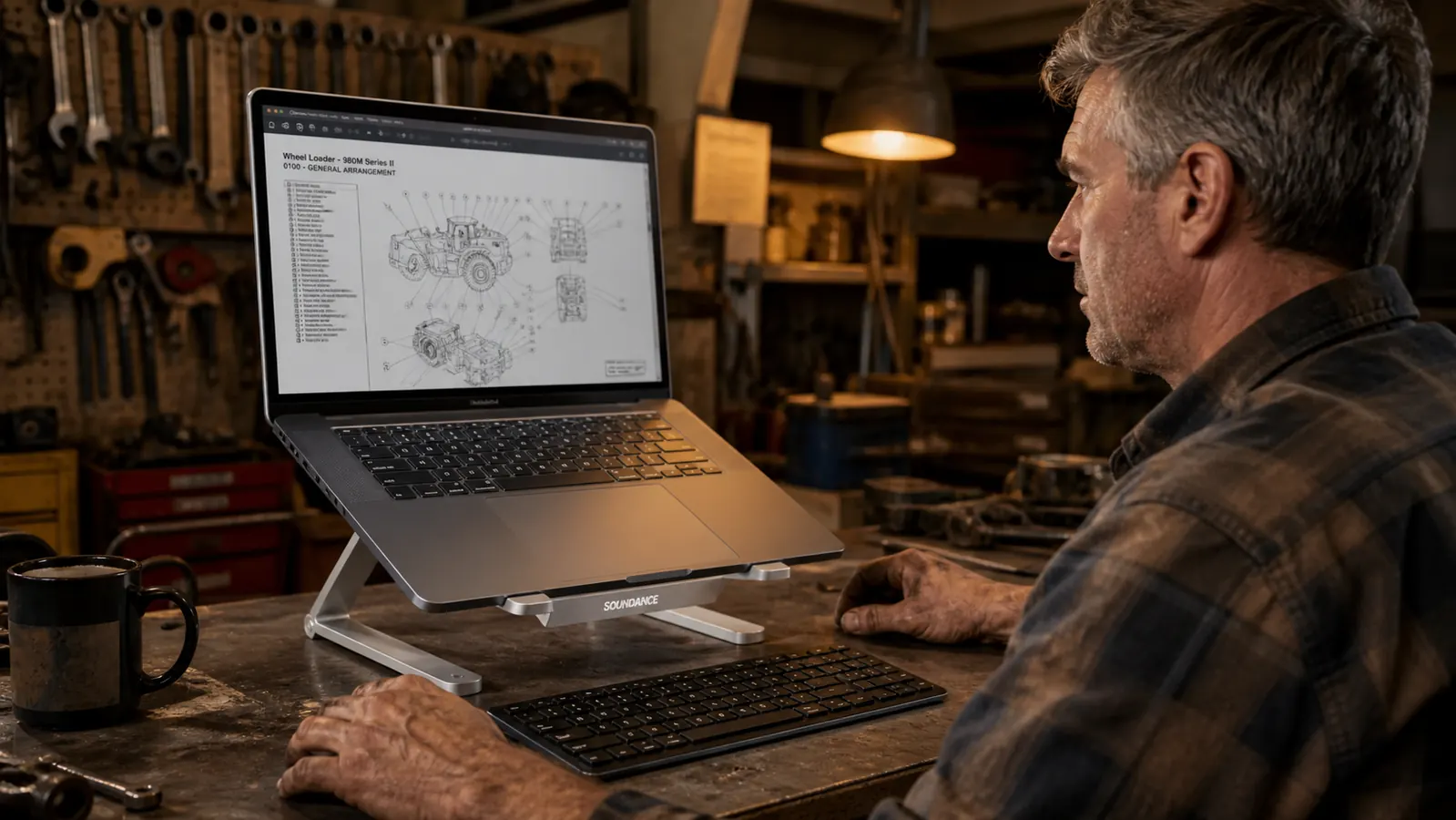
My daily setup is a 15-inch work laptop, which is not a dainty little machine. It's got the feel of a tool you'd have to order through a dealer, thick and heavy, and it runs warm. On top of that I've got a full-size wired keyboard and mouse in front of it, plus a cup of coffee that has no business being anywhere near electronics. I've used the SOUNDANCE stand every working day for over four months now, usually seven or eight hours at a stretch, and it has never once complained.
The way I judge any tool is simple: does it hold up, is it built right, does it earn its place on the bench? I've had stands that feel great in the box and then rock every time you type, which is worse than nothing because it feels broken all day. The SOUNDANCE doesn't do that. It's a single solid piece of aluminum with rubber strips on the top and bottom, and once your laptop is seated it sits there like it's bolted down.
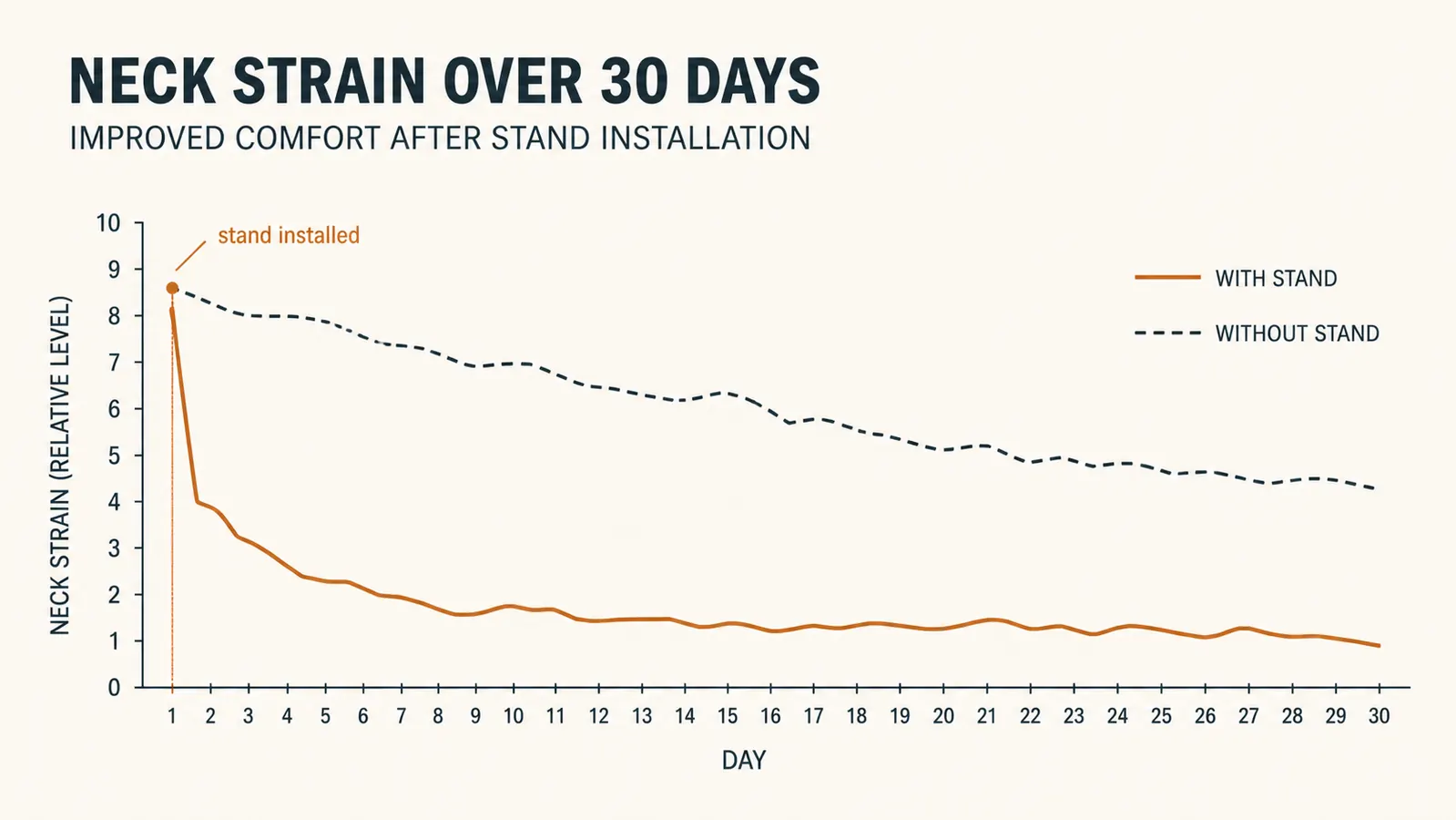
The screen comes up to right around eye level, which is the whole point. My neck went from that bad pitched-forward angle to a normal working posture within a day. Dozer didn't care, but I did. That's really the review, if you want it in one line: it fixes the neck thing and it doesn't wobble. Everything else is detail.
What Nobody Tells You About the Grip Pads
Here's the part the product page won't tell you. The top of the stand has a rubber strip that your laptop sits against, and it does a real job of keeping the machine from sliding forward. I've typed hard enough to move the whole desk and the laptop hasn't budged. That's the good news, and it's genuinely good.
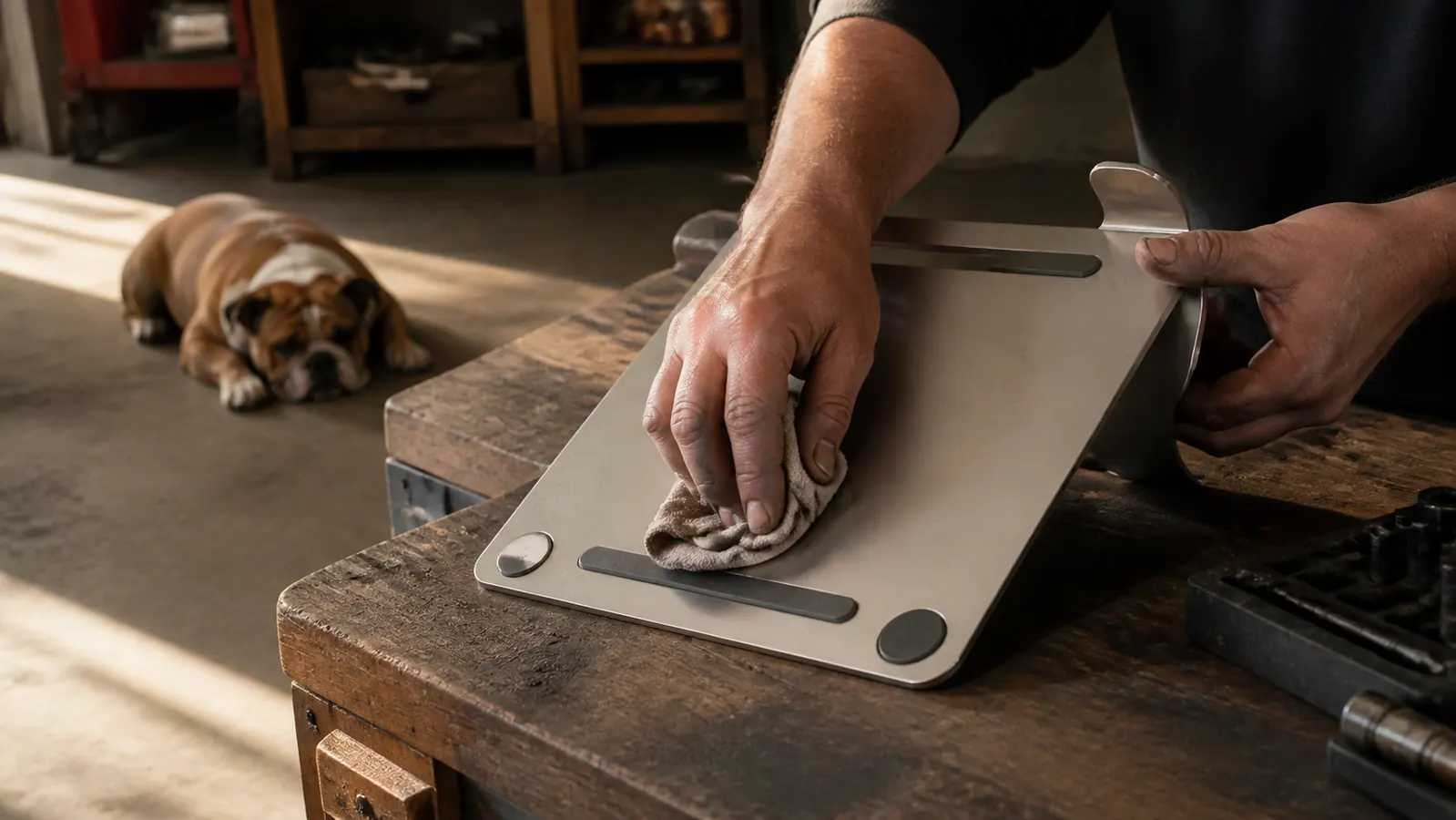
The catch is the rubber on the bottom, where the stand meets the desk. The little pads grip steel and aluminum workbench tops great, but they pick up dust and shop grime like it's their job. I've got a light coating of garage dust on everything, and I've noticed the stand wants to slide just a touch on a smooth surface once the pads get dirty. It's a two-second fix with a damp rag, but it's worth knowing going in. You'll be cleaning those pads more often than you think.
And one more small thing: there's no cable management built in. The cord for my charger just dangles down off the back. It's a minor annoyance, not a dealbreaker, but if you're the kind of person who likes everything routed and tidy, you'll want to add your own clip or a Velcro strap. I made a little loop out of a zip tie and called it done.
I typed hard enough to move the whole desk and the laptop never budged. That's the strongest thing you can say about a stand.
Heat: Does It Cook Your Laptop?
This was the question I had before I bought it, because my work laptop gets genuinely warm under load and I didn't want to trap that heat and shorten its life. So I'll tell you straight from four months of running it: the SOUNDANCE stand does not make the heat problem worse, and in my case it actually helped a little.
Here's why. When the laptop sits flat on a desk, the bottom vents get pinned against the surface and heat has nowhere to go. On this stand the laptop is up off the desk, the underside is open to the air, and most of the venting on the bottom and sides stays clear. The aluminum itself is a decent heat sink too, so the whole stand runs warm to the touch, which tells me it's pulling heat away from the machine. Unplug a heavy 15-inch from a stand like this and you've got a worse thermal situation than a cheap plastic riser that lacks any airflow.
The one honest note: this is a fixed, non-ventilated piece of aluminum. There are no fans, no grilles, no channels machined in. If you're pushing the loudest graphics card in a gaming laptop all day, you'd want a fan stand, not this. But for normal office work, parts orders, video calls, and the occasional spreadsheet that makes you angry, the open underside is plenty.
Stability, Day In and Day Out
Stability is where cheap stands fail and where this one wins, and it's not even close. I've used stands before that flex, that rock, that develop a twist in the hinge after a month until the screen sits sideways. The SOUNDANCE is one solid milled piece. There's no hinge to wear out, no fold mechanism to loosen, nothing that can get sloppy over time. It's the difference between a part that's built right and one that just looks the part, and I've spent my whole career telling that difference apart by sound.
When you're on a video call and you lean in to point at something on screen, you don't want the whole laptop tipping toward you. I can lean on this stand with my full weight and it doesn't so much as creak. Dozer has bumped into the desk leg hard enough to shove it across the concrete and the stand stayed put. That's the stability story, and it's a real one.
The one thing to check before you buy, and this is the honest part: it's an open frame, so your laptop cantilevers out over the front edge a little. A big heavy machine seated back in the rubber groove is fine. Just seat it properly and it's rock solid. Shove it forward on the tray and it's less happy. Common sense, really, but worth saying because we've all done it.
Build Quality and Fit
The aluminum is thick enough that it doesn't resonate or ring when you type, which is the kind of thing that bugs me. Thin metal trays have a tinny feel, like tapping on a cheap toolbox. This one has a dead, solid feel to it, the way a proper drawer handle does. Edges are smooth, no sharp burrs that'll catch your forearm. The finish is a plain silver that matches just about any desk and doesn't look out of place next to greasy workbench stuff.
Fit-wise, it's listed for 10 to 17 inch laptops and that range is honestly about right. A 15-inch sits in it comfortably with room to spare. The rubber lip at the front keeps the laptop from sliding forward, and the rear ridge stops the machine from kicking back off the back edge. You adjust the height by moving the hinge to one of several angles, and it holds whatever angle you set with no drift. Set it once and it stays.
What's Actually Not Great About It
I told you this was the honest review, so here's the honest list of downsides, because there are a few and they're not dealbreakers, but you deserve to know them before you hand over your money.
First, the grip pads picking up dust, which I already mentioned. Second, no cable management, which I fixed with a zip tie. Third, if you're one of those people who wants to switch between standing and sitting and angle the whole thing like a fancy monitor arm, this won't do that. A stand like this only does one job, raise the screen, and it does that job well. It doesn't try to be a standing desk or a monitor arm. If you want all that, you're looking at the wrong product in the wrong price range.
Fourth, and this is the most honest note of all: nothing here is fancy. There's no RGB, no wireless charging, no USB hub, none of the bells that light up a product page. Some people will love that about it. If you're the type who likes your desk gadgets to blink and light up, this stand will feel plain to you. Me, I'd rather have a plain piece of aluminum that doesn't wobble than a gadget that lights up and falls apart in a year.
What I Liked
- Solid one-piece aluminum that doesn't wobble or flex, even under heavy typing
- Raises the screen to eye level and fixed my neck strain in a day
- No hinge to wear out, no moving parts that get sloppy
- Open underside keeps a laptop cooler than sitting flat on a desk
- Holds a heavy 15-inch work laptop dead steady at any angle you set
- Simple, tool-grade build with no sharp edges
Where It Falls Short
- Rubber pads on the bottom pick up dust and grime and need a wipe
- No cable management built in, you'll add your own clip or tie
- Fixed riser only, it won't function as a standing desk or monitor arm
- No vents or fans, a real gaming laptop under heavy load would want more airflow
Who This Is For
This stand is for anyone whose neck hurts because their screen sits too low, and who wants a fix that's built once and forgotten. If you're setting up a home office for the first time, like I did, and you're typing on a laptop that sits flat on the desk, this is the single cheapest ergonomic fix you can make, and it works immediately. It's for the person who wants one solid, boring, dependable piece of equipment that does its one job and gets out of the way.
It's also for the person who doesn't want to fiddle with a pile of books or a hacked-together rig to get the screen height right. I ran out of patience with the make-do approach fast. A stand that raises a screen to eye level and holds it there, unbothered, is worth more than its price just in not having to think about it. That's the whole appeal, and this one delivers on it.
Who Should Skip It
Skip it if you need more than a simple riser. If you want a full standing-desk setup, or a monitor arm that swings the screen all over the desk, or a dock with power delivery and ports built in, this isn't the tool for that job and you shouldn't force it. Get the right tool for the job, that's rule one, and rule one applies here like everywhere else.
Skip it if you run a heavy gaming laptop that needs aggressive cooling under load. This stand gives good open airflow, but it's not a fan stand, and a machine pushed hard all day deserves a dedicated cooling solution. And skip it if you're the type who wants desk gear that lights up and adds zero function. This stand has zero flash and is better for it, but if blinking lights are the point for you, you'll be disappointed.
Here is the part I did not see coming. The SOUNDANCE stand fixed my neck, but it also fixed my video calls. I had been propping the laptop on shop manuals, which meant the camera was pointed at the underside of my chin and the overhead fluorescent was bouncing off the screen behind me. Customers on the other end of the call saw me as a chinned shadow with a halo. Once the laptop was up at eye level on the SOUNDANCE, the camera was at my eye line, the screen was at a real angle, and the fluorescent was no longer in frame. I did not look like a guy in a garage anymore. I looked like a guy at a desk. That is not a small thing when a customer is deciding whether to trust you with their engine. The other thing I want to flag is the cable slot in the back. The stand has a routing channel for a charging cable, and I ignored it for the first three months. Then I got tired of the cable hanging across the back of the stand, and I threaded it through. It took ten seconds and it made the desk look like a real workspace instead of a pile. The little details matter. They are the difference between a stand you tolerate and a stand you forget is there.
A raised screen fixed my neck in a day, and it'll do the same for you
This is the plain, dependable fix: get the screen up to eye level and keep it there. If the SOUNDANCE fits your laptop, it's earned its place on your bench too. Check today's price on Amazon.
Amazon Check Today's Price on Amazon →At the end of the day, this is a simple tool doing a simple job well. It's not going to change your life, it's not going to make you a better parts buyer, and it's not going to turn Dozer into a lapdog. It raises your laptop to eye level, holds it steady for months on end, and costs less than a good set of shop gloves. If that's what your desk needs, you could do a lot worse, and I couldn't find better in this price range.